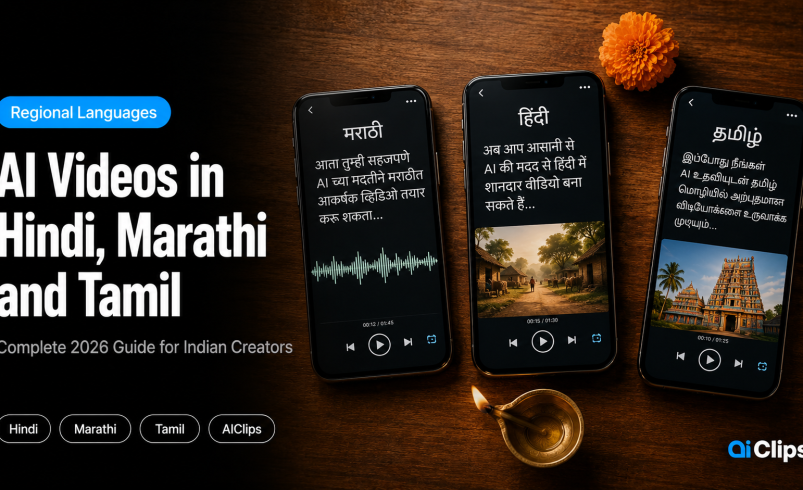

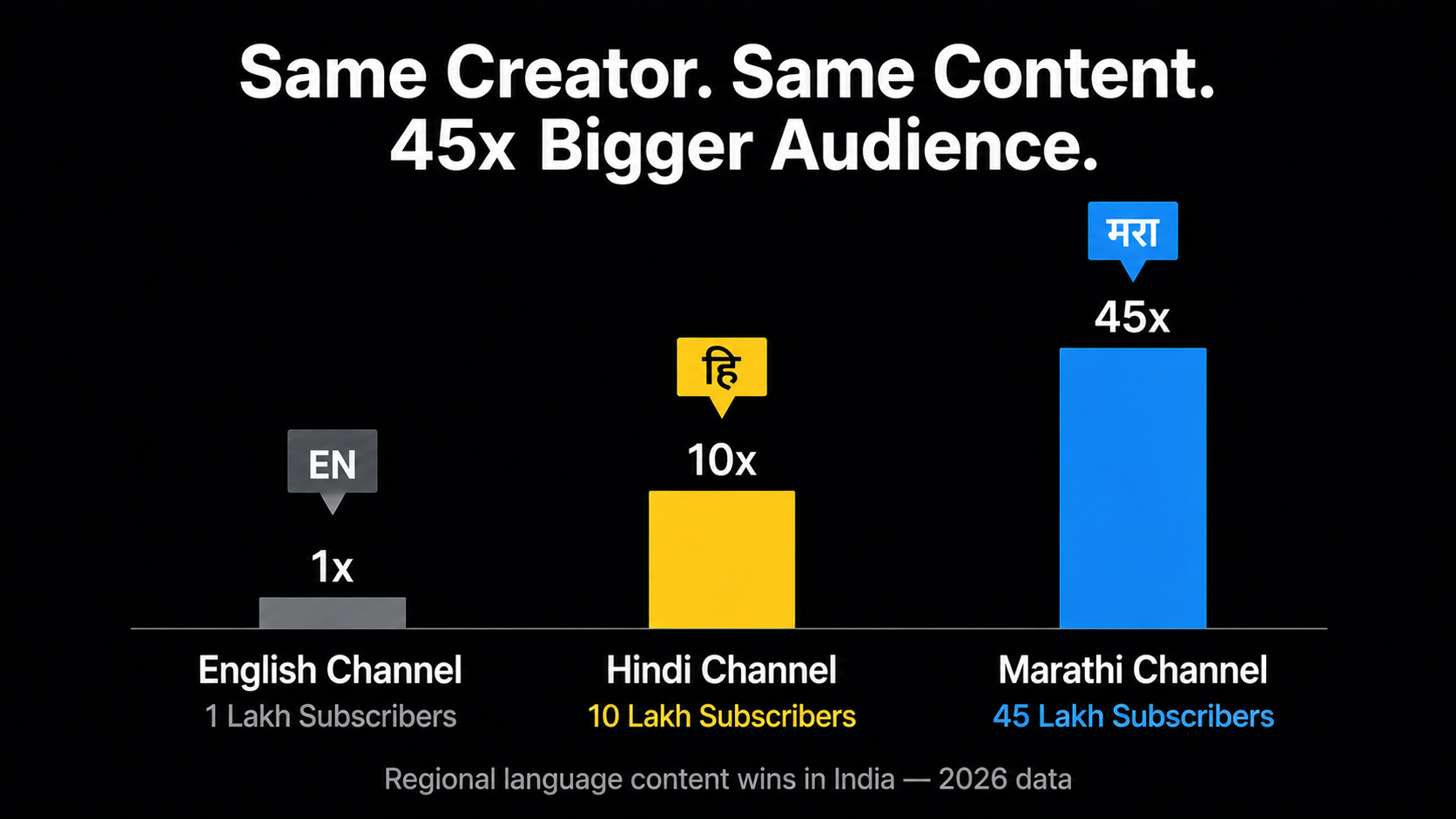
Madhura Bacha is a Pune-based food creator. Her English YouTube channel has 1 lakh subscribers. Her Hindi channel has 10 lakh. Her Marathi channel — the youngest of the three — has 45 lakh. Same creator, same content, three different languages. The Marathi channel is 45 times bigger than the English one. This is the regional Indian language AI opportunity in one data point.
This guide is a step-by-step walkthrough of making a Marathi AI video, Hindi AI video, and Tamil AI voiceover using AIClips — covering script formatting, voice selection, video generation, and the specific pronunciation issues that trip up AI tools on regional Indian languages.
| The opportunity | 73% of India’s 900 million internet users consume content in regional languages. Regional content generates 1.5–2x higher engagement than English content with significantly less competition. |
| Languages on AIClips | Hindi, Marathi, Tamil, Telugu, Bengali — all supported across TTS and video generation tools. |
| Key rule | Write regional language scripts in native script (Devanagari for Marathi/Hindi, Tamil script for Tamil). Do not transliterate into Roman — it reduces TTS accuracy significantly. |
| Cost | ₹349/month (Creator plan). Realistic Voiceovers app unlimited on Agency plan (₹999/month). |
| What this guide covers | Full workflow for Marathi, Hindi, and Tamil — scripts, voice selection, video generation, common fixes. |
Why Regional Indian Language Content Wins in 2026
The data is specific enough to be useful. Tamil content creators grew follower bases by 320% in 2025. Bengali comedy channels added 15 million new subscribers in a single year. Marathi lifestyle creators are securing brand deals that, two years ago, would have gone exclusively to Hindi creators.
The reason is straightforward. 90% of all video consumption in India is in local languages. When you create content in someone’s mother tongue, you are not just translating — you are building a different kind of trust. A viewer watching a Marathi AI video about personal finance from a Pune creator processes it differently than the same information in English from a global creator.
The competition gap is also real. There are millions of English and Hindi creators competing for attention. The Marathi creator pool is a fraction of that. The Tamil educational content space, despite its enormous audience, has far fewer high-quality creators than Hindi. This is not a niche — it is an under-served audience of tens of millions of people.
Regional Languages Supported on AIClips
| Language | Script | AI TTS Support | Video Generation | Estimated YouTube Audience |
|---|---|---|---|---|
| Hindi | Devanagari | Excellent — multiple voice options | Seedance 2.0, all video models | 550+ million speakers |
| Marathi | Devanagari | Good — ElevenLabs, Minimax | All video models | 83 million speakers |
| Tamil | Tamil script | Good — ElevenLabs multilingual | All video models | 75+ million speakers |
| Telugu | Telugu script | Moderate — fewer native voice options | All video models | 82 million speakers |
| Bengali | Bengali script | Moderate — improving rapidly | All video models | 230+ million speakers |
Write Your Script in Native Script — Not Roman
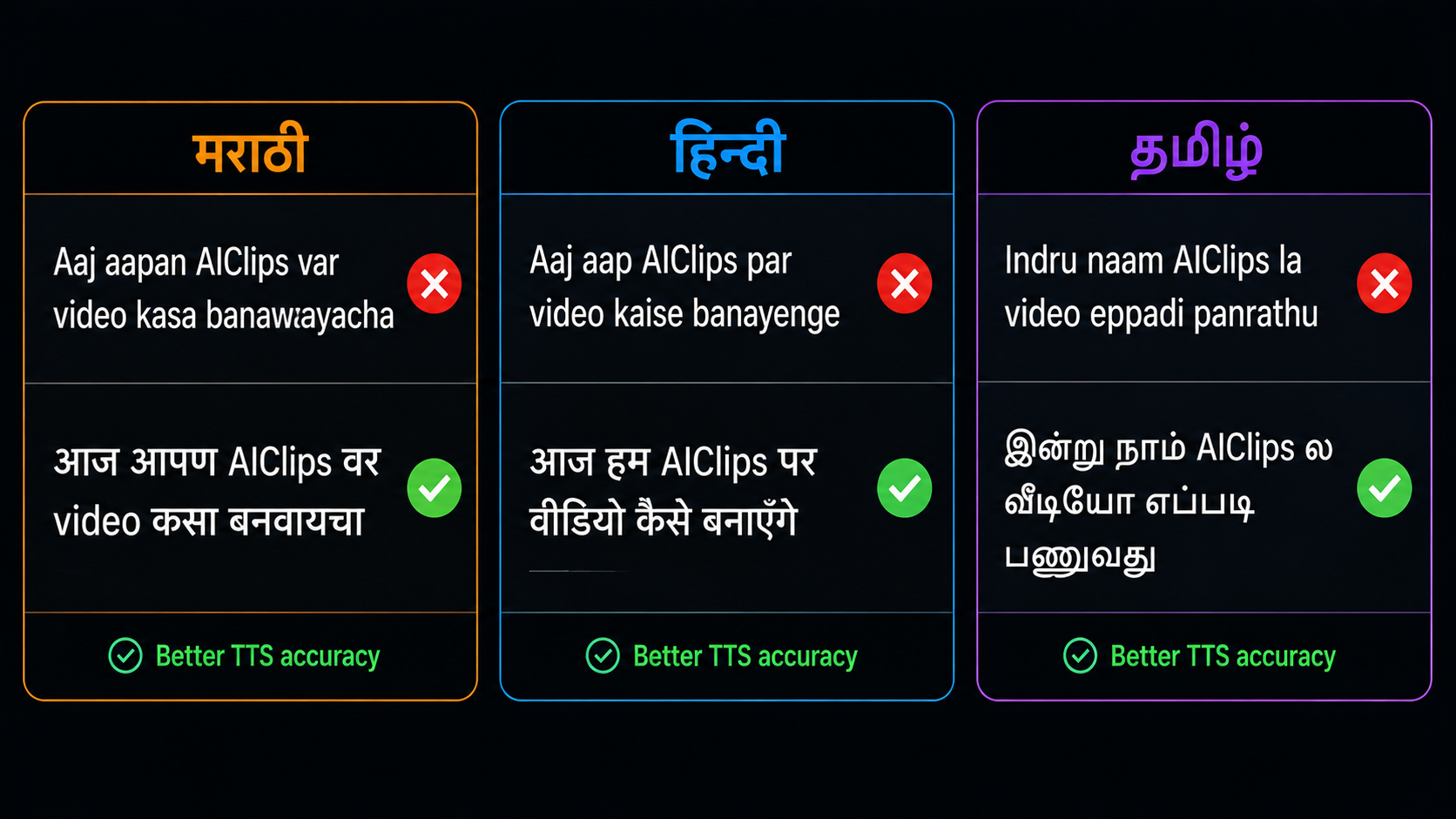
The most common mistake creators make when building regional language ai content is writing scripts in Roman transliteration. “Aaj aamhi pahato” instead of “आज आम्ही पाहतो” for Marathi. “Inru naam paarkiren” instead of “இன்று நாம் பார்க்கிறோம்” for Tamil.
TTS models trained on Indian languages use native script for phoneme mapping. Roman transliteration produces inconsistent pronunciation because the same Roman letters map to different sounds depending on the language. The model guesses, and the guess is frequently wrong.
The rule: write regional language words in their native script. Write English words (brand names, technical terms) in Roman script. Keep sentences short — 8–12 words maximum for regional languages. Add commas and dashes where a human speaker would pause.
| Language | Write This | Not This |
|---|---|---|
| Marathi | आज आपण AIClips वर video कसा बनवायचा ते पाहूया। | Aaj aapan AIClips var video kasa banawaayacha te pahuyaa. |
| Hindi | आज हम देखेंगे कि AIClips पर video कैसे बनाएं। | Aaj hum dekhenge ki AIClips par video kaise banayen. |
| Tamil | இன்று நாம் AIClips இல் video எப்படி உருவாக்குவது என்று பார்ப்போம்। | Inru naam AIClips il video eppadi uruvakkuvathu endru paarppom. |
Choose the Right Voice for Each Regional Language
Voice selection for regional Indian languages follows different logic than English. The accent, dialect, and tonal quality that sounds natural to a Tamil audience is completely different from what sounds natural to a Marathi audience — even though both are Indian.
| Language | Best Tool on AIClips | Voice Selection Tips |
|---|---|---|
| Hindi | ElevenLabs TTS or Realistic Voiceovers | Choose North Indian neutral accent for widest reach. Mumbai accent for lifestyle content. Delhi/UP accent for news-style content. |
| Marathi | ElevenLabs multilingual or Minimax Speech | Pune-standard Marathi for most content. Select female voice for lifestyle and food; male for educational or news content. |
| Tamil | ElevenLabs multilingual | Chennai Tamil for standard content. Avoid voices with heavy North Tamil accent for content targeting pan-Tamil audiences. |
| Telugu | ElevenLabs multilingual or Qwen 3 TTS | Andhra vs Telangana dialects are distinct. Specify the region if your audience is geographically specific. |
| Bengali | ElevenLabs multilingual | West Bengal Bengali (Kolkata standard) is most widely understood. Bangladesh Bengali has distinct pronunciation — different audience. |
For the hindi ai video maker workflow specifically: the Realistic Voiceovers app on AIClips offers the widest selection of Hindi voice profiles — by gender, age, regional accent, and style (conversational, narration, news). It is unlimited on the Agency plan, which makes it the most cost-effective option for creators producing Hindi content daily.
Generate Video That Matches the Language
Video generation for regional language content follows the same workflow as any other video — the language lives in the voiceover, not in the video model itself. But there are specific ways to make the visual content feel more regionally authentic.
Use regional-specific visual references in your prompts. For Marathi content, specify Maharashtra settings — Pune streets, Konkan coastline, Nashik vineyards, Vidarbha countryside. For Tamil, specify Chennai Marina Beach, Madurai temple gopuram, Nilgiri tea estates. For Hindi, the visual range is broader — but specifying North Indian architecture, dress, and landscape makes the output feel genuinely Hindi-speaking-region specific rather than generically Indian.
Match your video aspect ratio to the platform. Most regional language content in India now performs best on YouTube Shorts and Instagram Reels — both 9:16. The longer-form YouTube audience for regional content uses 16:9. Choose before generating.
Full Workflow Walkthroughs
मराठी Marathi AI Video
The opportunity: Marathi YouTube channels consistently outperform their Hindi and English equivalents by the same creator. 45 lakh subscribers for a Marathi channel vs 1 lakh for English is not unusual. Marathi-language brand deals are now mainstream in Maharashtra.
Script example — YouTube intro (Marathi):
Short sentences. Dashes for pauses. English words (AIClips, video, steps) in Roman script. Rupee symbol renders correctly in Devanagari TTS context.
Voice selection: In the Realistic Voiceovers app, select Language: Marathi → Accent: Pune Standard → Style: Conversational for Reels. For educational content, switch to Narration style.
Video prompt for Marathi context:
“A young Marathi woman in a simple cotton saree sits at a wooden desk with a laptop, in a bright home office in Pune. She looks at the camera and begins speaking. Natural afternoon light from a window. Warm, approachable feel. Handheld camera, slight movement. Background shows a bookshelf and a Ganpati idol on the desk.”
Common Marathi TTS issue: The retroflex sounds (ट, ड, ठ, ढ) in Marathi are pronounced differently from their Hindi counterparts. If the output sounds too Hindi-accented, switch from Devanagari Hindi voice to a dedicated Marathi voice in the voice library.
हिन्दी Hindi AI Video Maker
The opportunity: 550+ million Hindi speakers. YouTube’s largest Indian language audience. The competition is highest here, but so is the monetisation. Hindi content commands the highest CPM rates among Indian regional languages at ₹80–150 per 1,000 views for quality channels.
Script example — Product review (Hindi):
The hindi ai video maker workflow works best when scripts are written as a creator would actually speak — not as formal Hindi but as conversational Hinglish. Mix Hindi and English as naturally as you would on camera.
Voice selection for Hindi AI video: ElevenLabs Hindi voices Viraj (energetic, tutorials), Ravikant (warm, documentary), Anant (confident, Reels). For a more informal vlog tone, try Muskaan or similar casual female voices.
Video prompt for Hindi content:
“A man in his early 30s, casual cotton shirt, sitting in a Delhi apartment living room. He speaks directly to camera with animated expressions and natural hand gestures. Behind him, a white wall with a small framed photo. Phone camera handheld feel, natural warm light from window. Authentic, conversational, not overly produced.”
Common Hindi TTS issue: Schwa deletion — the inherent “a” vowel dropped in spoken Hindi. “राम” is “Raam” not “Raama.” If the voice sounds over-enunciated, add punctuation breaks between words in the most formal-sounding sections to force the model to slow down and self-correct.
தமிழ் Tamil AI Voiceover
The opportunity: Tamil content creators grew by 320% in follower count in 2025. 75 million Tamil speakers worldwide. Tamil YouTube channels have a passionate, engaged audience that shows much higher viewer loyalty than pan-Indian Hindi channels of equivalent size.
Script example — Educational intro (Tamil):
Tamil script renders correctly in ElevenLabs multilingual TTS. Keep the ending question “ஆரம்பிக்கலாமா?” (Shall we start?) — it creates a natural rising intonation that the tamil ai voiceover model handles well and sounds engaging to Tamil audiences.
Voice selection for Tamil AI voiceover: ElevenLabs multilingual with Tamil language selected. Look for voice profiles tagged “South Indian” or “Tamil” in the library. The male voice “Rahul” on ElevenLabs has been noted by Tamil creators as the most naturally-sounding for tutorial content.
Video prompt for Tamil context:
“A woman in a traditional cotton salwar, seated in a bright classroom-style setting in Chennai. She looks at camera with an encouraging expression, speaking clearly. Behind her, a whiteboard with Tamil text. Natural fluorescent lighting. Static camera, medium shot. Educational and approachable tone.”
Common Tamil TTS issue: The distinction between short and long vowels in Tamil (அ vs ஆ, இ vs ஈ) is critical for natural-sounding output. AI models occasionally flatten this distinction. If specific words sound wrong, rewrite them with explicit punctuation around the problematic vowel to force the model to hold it longer.
Common Regional Language AI Issues and Fixes
| Issue | Language Affected | Fix |
|---|---|---|
| English words mispronounced with regional accent | All languages | Keep English words in Roman script within the regional script sentence. Do not transliterate “video” into Tamil or Marathi script. |
| Voice sounds too Hindi-accented for Marathi content | Marathi | Use a dedicated Marathi voice profile, not a Hindi voice reading Marathi text. The phoneme sets are similar but distinct. |
| Tamil short vowels elongated | Tamil | Add a comma immediately after the short vowel word to create a micro-pause. This forces the model to reset rather than carry over the elongation. |
| Schwa over-pronunciation in Hindi and Marathi | Hindi, Marathi | Add punctuation breaks in formal-sounding sections. Break long words into shorter phonetic units if the model consistently mispronounces a specific compound word. |
| Regional numbers mispronounced | All languages | Spell out numbers in the regional language script, or use Roman numerals — not Devanagari/Tamil numerals, which some TTS engines still handle inconsistently. |
| Loan words from Sanskrit mispronounced | Tamil specifically | Tamil has many Sanskrit-origin words that are pronounced differently in Tamil than in Hindi. Check the output on these words specifically and rewrite phonetically if needed. |
Combining Voiceover and Video for Regional Language Content
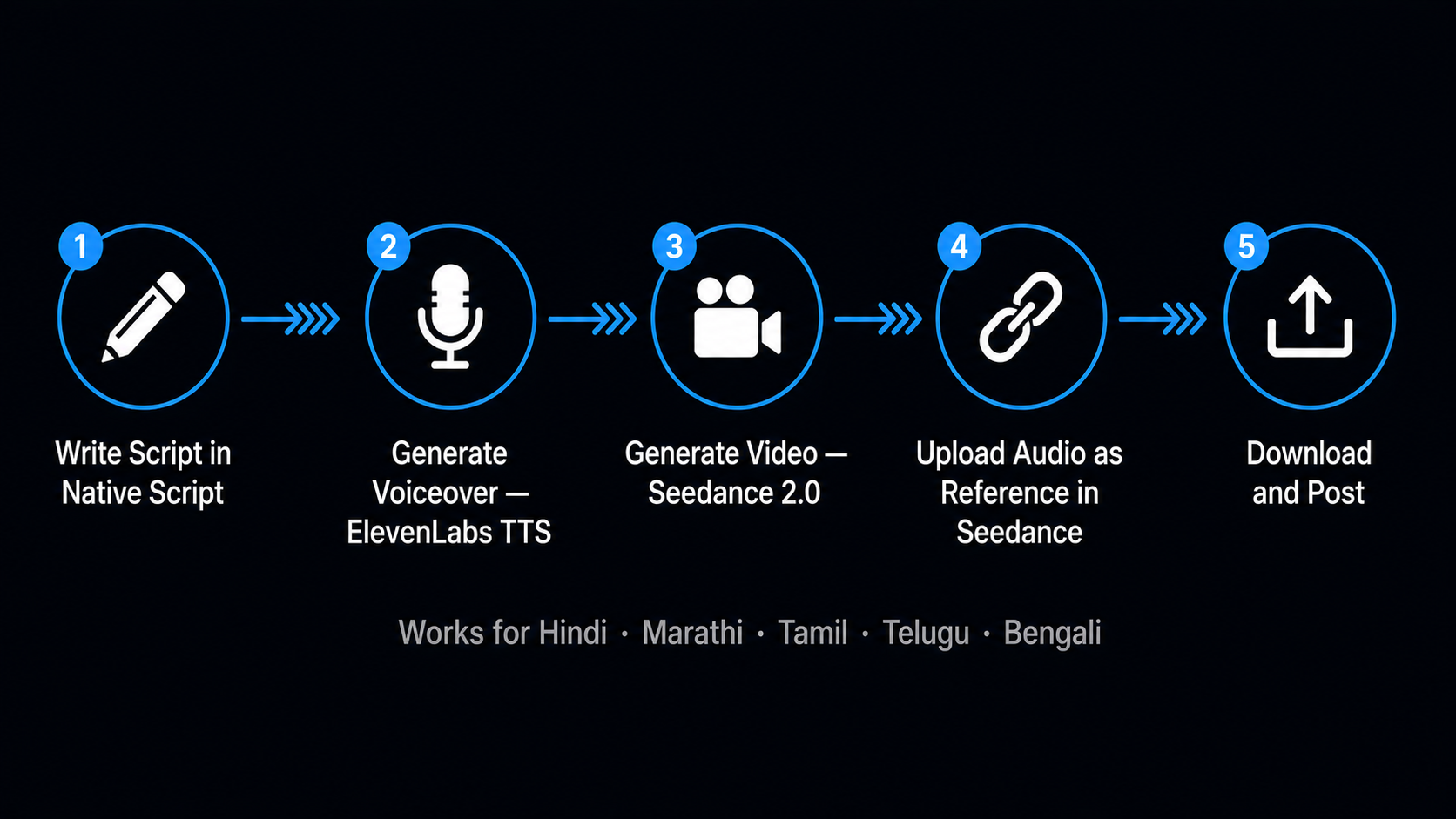
The full regional language ai video workflow on AIClips is:
- Write your script in native script with English brand names in Roman
- Generate the voiceover using the appropriate TTS tool (ElevenLabs for best quality, Realistic Voiceovers for unlimited daily use)
- Generate the video using Seedance 2.0 with region-specific visual prompts
- Upload the voiceover as an audio reference in Seedance 2.0 — the model will synchronise video pacing to the audio
- Download, review, and post
The audio reference feature in Seedance 2.0 is particularly useful for regional language content — it ensures the video’s visual rhythm matches the natural pace of regional speech, which tends to vary significantly from the uniform pacing English TTS produces.
For a detailed guide on Hindi TTS specifically — script formatting, emotion tags, Hinglish handling — read the Hindi Voiceover AI guide. For the full end-to-end workflow from script to Reel, the Script to Reel in 30 Minutes guide covers every step.
Frequently Asked Questions
Can AIClips make Marathi AI video content?
Which Indian languages does AIClips support for TTS?
Should I write Marathi in Devanagari or Roman script for TTS?
Is there a dedicated Tamil AI voiceover tool on AIClips?
Why does my regional language voiceover sound too formal or robotic?
How do I make a full Marathi or Tamil video — not just voiceover?
Make Your First Regional Language Video on AIClips
Hindi, Marathi, Tamil, Telugu, Bengali — all supported from ₹349/month. No separate subscriptions.
Start on AIClips →