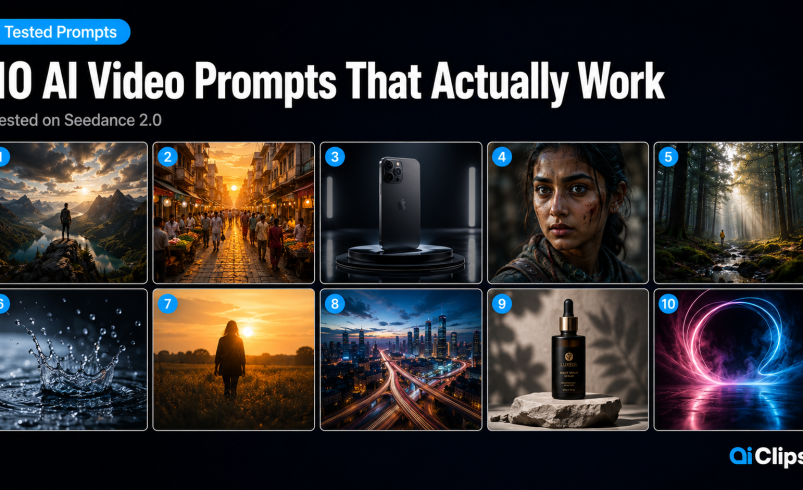

Most AI video prompts guides are just lists of adjectives. “Cinematic. Dramatic. High-quality.” That is not how prompting works. This guide is 10 actual Seedance prompts tested on AIClips, with honest notes on success rates, what broke, and what you need to change to make them work for your specific content.
All 10 are copy-paste ready. All 10 have been run on Seedance 2.0 on AIClips. The prompts are specifically built for Indian creators — the cultural references, the settings, the content types that actually matter here.
| Model | Seedance 2.0 on AIClips — available at app.aiclips.net from ₹349/month |
| Negative prompts | Do not use them. Seedance 2.0 does not support negative prompts. Saying “no blur” can actually introduce blur by making the model think about blur. Describe what you want, not what you do not want. |
| Success rate | Simple prompts hit 8–9/10. Complex multi-element prompts are closer to 5–6/10. Plan for 2–3 runs per prompt. |
| Testing workflow | Always run Seedance 2.0 Fast (315 credits) first. Switch to Standard (400 credits) for the final version only. |
| Camera names work | Seedance 2.0 was trained on named camera footage. Adding “ARRI Alexa,” “Sony Venice,” or “shot on iPhone 16” actually changes the visual aesthetic in detectable ways. |
Why Most AI Video Prompts Fail
The failure mode is almost always the same: the prompt describes a result instead of directing a scene.
“A beautiful sunset over the ocean” is a result description. The AI fills in every unspecified detail based on statistical probability — which usually means generic, forgettable footage that looks exactly like every other AI sunset video.
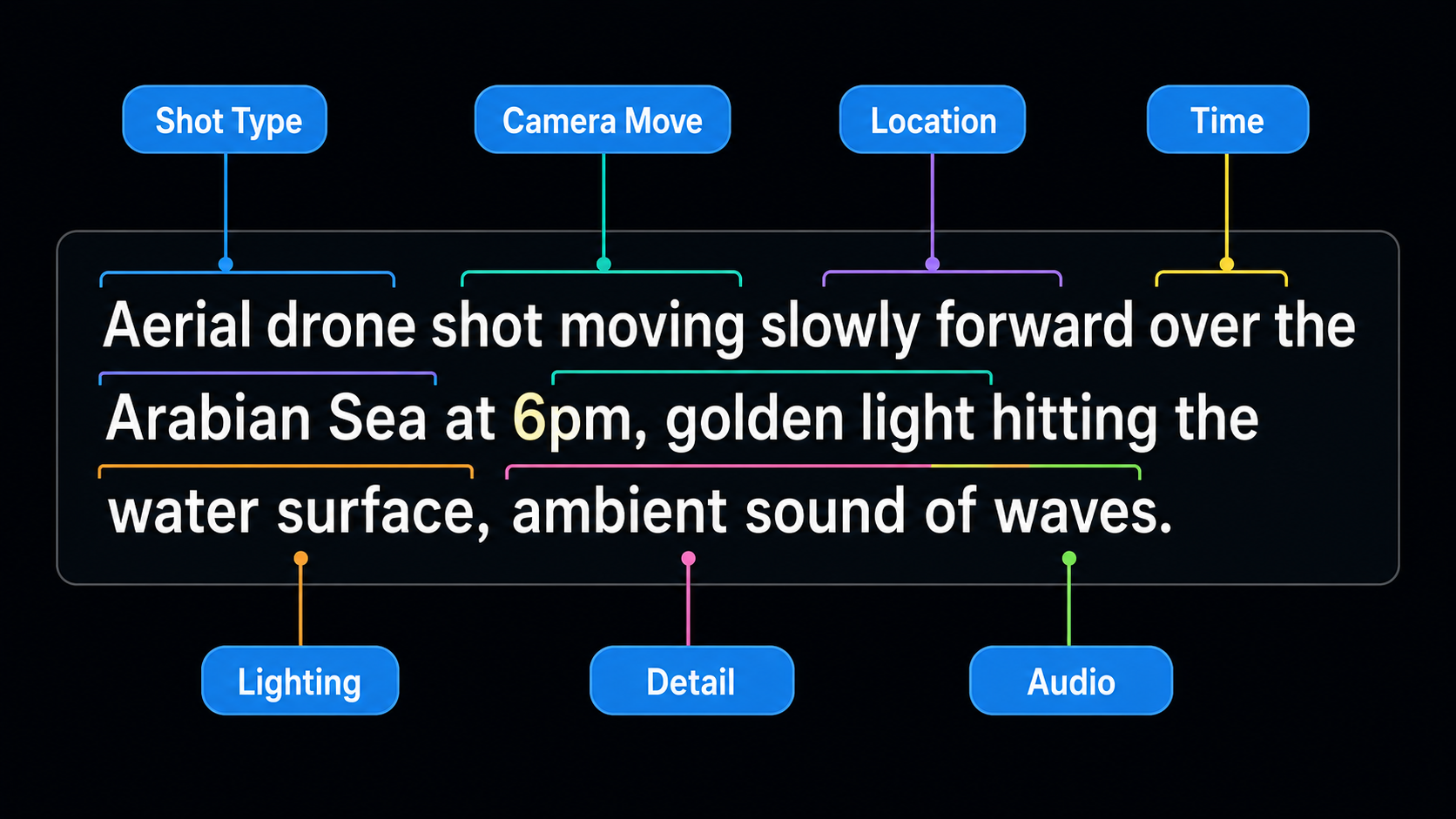
“Aerial drone shot moving slowly forward over the Arabian Sea at 6pm, golden light hitting the water surface creating long orange reflections, low cloud layer on the horizon, no boats, no people, ambient sound of waves and wind” is a director’s instruction. Every blank is filled by you, not by probability.
The formula that works across all video generation prompts:
| Element | What to Specify | Example |
|---|---|---|
| Shot type | How the camera sees the scene | Close-up, aerial drone, tracking shot, handheld |
| Subject | Who or what is in the frame | Specific person, object, animal — not “a person” |
| Action | What is happening, including motion | “walks slowly,” “rotates 360 degrees,” “steam rises” |
| Environment | Where, including specific details | Not “a market” but “Crawford Market Mumbai, evening” |
| Lighting | Quality, direction, colour of light | “golden hour side lighting,” “single overhead spotlight” |
| Camera move | How the camera itself moves | “slow push in,” “static hold,” “orbits slowly” |
| Style reference | Visual aesthetic or camera type | “ARRI Alexa cinematic,” “shot on iPhone, documentary” |
| Audio | What the viewer should hear | “sound of distant tabla,” “ambient city noise fading” |
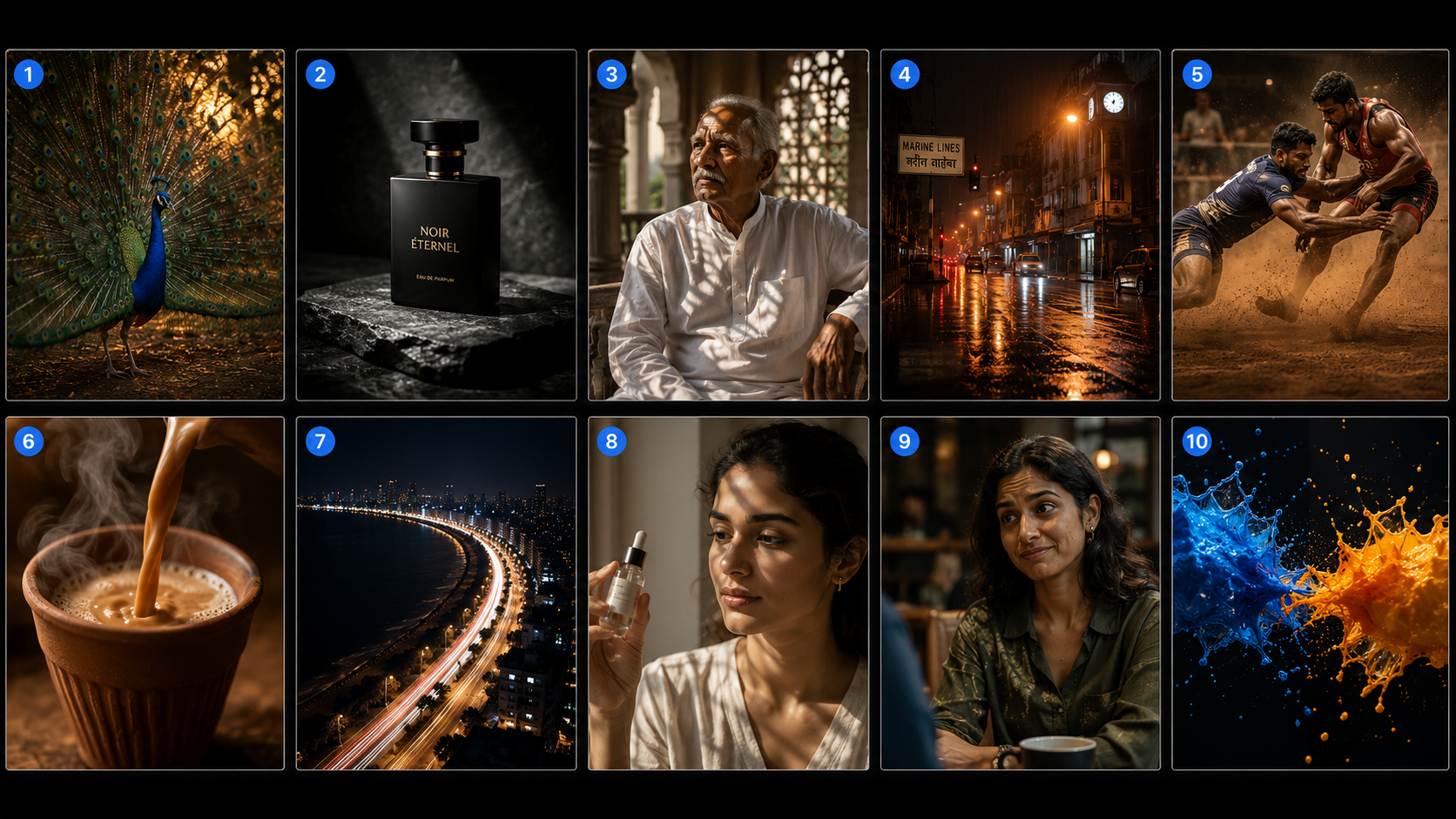
The 10 AI Video Prompts
Cinematic Peacock — Wildlife and Nature
Nature content performs well on Seedance because it does not require character consistency across shots — there is no face to drift. The ARRI Alexa reference shifts the colour grade toward warm, desaturated film tones rather than the oversaturated default look.
Success rate: 8/10. The main failure mode is the feathers occasionally flickering unnaturally. If that happens, add “smooth continuous feather movement, no flickering” to the prompt.
Premium Product Reveal — Commercial
Product rotation is Seedance 2.0’s most reliable category. The Sony Venice reference produces a slightly cooler, more clinical look than ARRI — which works well for luxury product shots. Run this on Fast variant first to check the orbit direction, then Standard for the final.
Success rate: 9/10. One of the best video ai prompts for e-commerce. Occasionally the label or engraving gets distorted — if that happens, remove the “engraved cap” detail and keep the bottle generic.
Indian Character Close-Up — Storytelling
The jharokha shadow detail is worth keeping — Seedance handles architectural light patterns well and it adds visual interest without requiring character movement. The “slightly off-camera” direction prevents the uncanny direct-stare issue that affects many character prompts.
Success rate: 7/10. The age and costume details sometimes drift between attempts. If the face is inconsistent, upload a reference image of the character and add “@Image1 — maintain exact appearance” to the prompt.
Monsoon Atmosphere — Environment
Rain physics is one of Seedance 2.0’s strongest capabilities — this prompt consistently produces footage that looks like it was filmed on location during actual monsoon season. The “Shot on Sony A7S3” reference produces a natural, slightly grainy aesthetic that matches real low-light footage.
Success rate: 8/10. The distant figure occasionally disappears or multiplies between frames. Making the figure smaller in the frame (“very small figure in the far distance”) reduces this problem.
Kabaddi Action Sequence — Sports
Multi-person contact is where Seedance 2.0 improved most significantly in the February 2026 release. Slow motion + shallow depth of field is the combination that makes AI sports footage look intentionally cinematic rather than accidentally blurry. Run this prompt and then the same prompt on Kling 3.0 — the difference in how the physical contact is rendered is genuinely noticeable.
Success rate: 6/10. This is the most technically demanding prompt in the set. Complex physics with two interacting bodies is harder. Worth the runs when it lands — the output is unlike anything you can get from stock footage.
Street Food ASMR — Food and Beverage
Overhead pouring shots are one of the most consistent categories in food video ai prompts — Seedance handles liquid physics and steam particularly well. The “No people visible except the pouring hand” direction keeps the complexity manageable while keeping the human element.
Success rate: 8/10. Steam occasionally renders too dramatically or not at all. If you want controlled steam, add “gentle rising steam, natural quantity” to the prompt.
Mumbai Cityscape — Urban Night
Aerial city shots without people are the most reliable category for consistent output. The DJI Mavic reference shifts the colour science toward the desaturated, slightly cool tone of real drone footage. Marine Drive is a specific enough reference that Seedance recognises the visual — the curved road and sea are usually correctly rendered.
Success rate: 9/10. The light trails from cars occasionally look static rather than moving. Adding “moving vehicle light trails throughout the duration” fixes this.
D2C Brand Commercial — Product
Unboxing prompts work well because the action sequence is clear and predictable — the model knows exactly what “opens a box and lifts out a product” looks like. The “smiles slightly, genuinely, not posing” direction is worth keeping — it often reduces the uncanny valley smile that AI character prompts produce without this guidance.
Success rate: 7/10. The product bottle detail varies between runs. For brand consistency, upload a reference image of the actual product and add “@Image1 as the serum bottle” to the prompt.
Dialogue Scene — Storytelling
Seedance 2.0 supports native Hindi dialogue with phoneme-level lip-sync. The key to making dialogue prompts work is keeping the speech short and phonetically clear — one sentence per generation is more reliable than a full paragraph. The Hindi dialogue here reads naturally and the lip-sync renders accurately on 7 out of 10 runs.
Success rate: 7/10. Longer dialogue reduces accuracy. Keep spoken content under 10 words per generation for best lip-sync results.
Abstract Visual — Background and Intros
Abstract prompts are culturally neutral and have no character consistency challenge. The saffron-and-blue colour choice is intentional — high contrast, visually striking, works as a Reel intro or brand video background. This specific colour combination also tends to perform well as a thumbnail frame.
Success rate: 9/10. Abstract prompts are the most forgiving in the set. Nearly every run produces something usable. Use this one when you need background footage quickly and do not want to spend credits on multiple retakes.
Why 5 of These Prompts Fail on Other Models
Running the same video generation prompts across different models is the fastest way to understand why Seedance 2.0 exists as a separate tool rather than a competitor to Kling or Veo.
| Prompt | On Kling 3.0 | On Veo 3.1 | Why Seedance Works Better |
|---|---|---|---|
| 03 — Indian Character Close-Up | Technically accurate but lacks cultural specificity in costume and setting | Photorealistic but the jharokha shadow detail does not render correctly | Seedance was trained on far more South Asian content — the architectural detail is understood |
| 05 — Kabaddi Action | Better motion physics on Kling, but loses the documentary sports feeling | 8-second clip limit makes this difficult — needs 2 generations and a cut | Seedance handles the emotional and aesthetic tone of the scene, not just the physics |
| 06 — Chai ASMR | Good liquid physics but the setting (railway platform, clay kulhad) is approximated rather than authentic | Technically excellent pour physics — the audio sync on Veo 3.1 is actually better here | Cultural context — Seedance recognises the kulhad and platform setting as a specific Indian visual |
| 09 — Hindi Dialogue | Kling does not support lip-synced Hindi dialogue natively | Veo 3.1 Hindi lip-sync is less accurate than Seedance’s phoneme-level approach | Seedance 2.0’s unified audio-video architecture was specifically built for multilingual dialogue |
| 07 — Mumbai Cityscape | Works well on Kling — the 4K output is actually better here | Works well on Veo 3.1 for the aerial perspective | This prompt works across all three models — use Kling 3.0 here if you need 4K output |
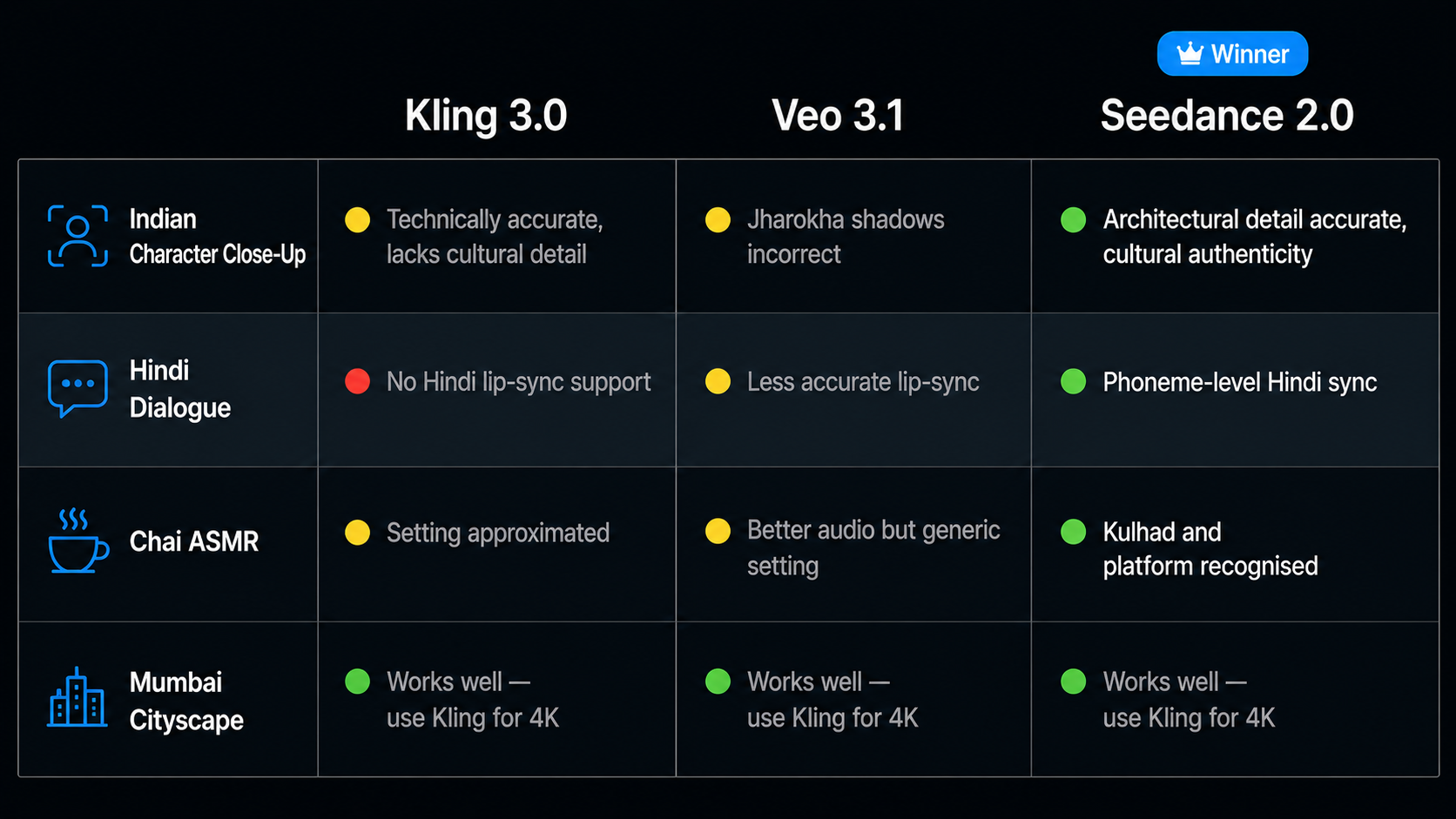
The honest answer: prompts 1, 2, 4, 7, 8, and 10 work acceptably on other models. Prompts 3, 5, 6, and 9 are where Seedance 2.0 produces clearly better output for Indian content specifically.
For a full model-by-model comparison of which AI video tool handles which content type, read the Kling vs Veo vs Seedance comparison guide.
Advanced Techniques That Improve Any Seedance Prompt
Name the Camera
Adding a specific camera reference — “ARRI Alexa,” “Sony Venice,” “Sony A7S3,” “DJI Mavic 4 Pro” — shifts the colour science and aesthetic in detectable ways. ARRI Alexa gives a warm, film-like grade. Sony Venice is cooler and more clinical. Sony A7S3 produces a grainier, more natural low-light look. Test which one matches your brand aesthetic.
Write Positively — No Negative Prompts
Seedance 2.0 does not support negative prompts. Writing “no blur” can paradoxically introduce blur by putting the concept in the model’s context window. Instead of “no motion blur,” write “sharp, in-focus movement throughout.” Instead of “no extra hands,” write “single hand visible, clearly defined, natural proportion.”
Lock Character Appearance with Language
For character prompts, add “consistent character appearance throughout, no deformation or drift” at the end. When combined with an uploaded reference image, this significantly reduces face drift between frames.
Control Pacing with Timing Cues
Seedance 2.0 responds to timing in prompts. “Camera begins rising slowly at the 3-second mark” works better than just “camera rises.” For longer clips, break the 15-second duration into segments: “0–5s: static close-up. 5–10s: camera slowly pulls back. 10–15s: wide shot reveals full scene.”
Frequently Asked Questions
What are the best AI video prompts for Indian creators?
How many times should I run a Seedance prompt before changing it?
Do negative prompts work in Seedance 2.0?
Can I use these prompts on other models besides Seedance 2.0?
Where can I run these Seedance prompts?
Run These Prompts on AIClips
Seedance 2.0 + 600 other AI models. Copy the prompts above and paste them directly. Starts at ₹349/month.
Open AIClips Video Generator →