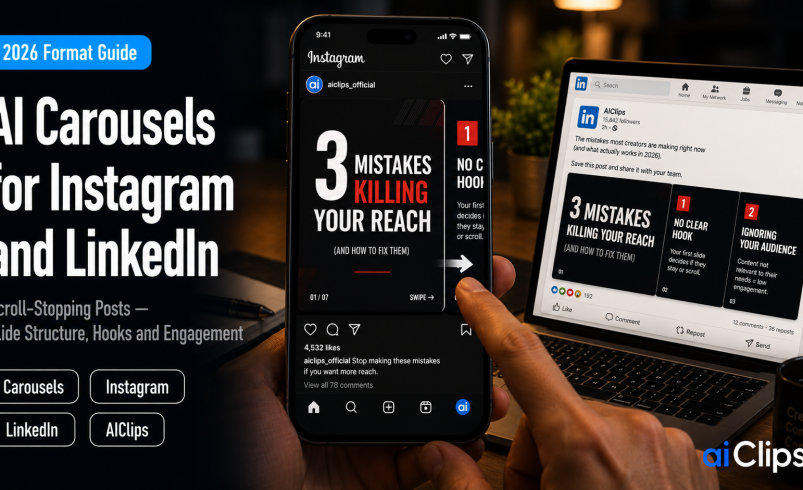

While everyone chased short video, the humble swipeable post quietly became the highest-engagement format on two major platforms. On LinkedIn, multi-image posts average around 6.6% engagement and document carousels around 6.1%, both ahead of video, single images, polls, and text. On Instagram, the carousel leads the formats even as overall feed engagement drifts down. The reason is mechanical: every swipe is a micro-commitment, and dwell time is what both algorithms reward. This guide covers how to build carousels that earn those swipes, and where AI genuinely speeds it up.
One caution before the tactics, because it shapes everything. AI can now generate a full deck in under a minute, and that is exactly why generic carousel output has flooded both feeds. LinkedIn’s 2026 algorithm actively penalises low-quality volume, so speed without substance is a losing trade.
| Why they win | Swiping increases dwell time, and both algorithms reward attention held. Carousels also earn saves, the strongest signal there is. |
| Slide count | 8–10 for Instagram, 6–10 for LinkedIn. Not every topic deserves ten slides. |
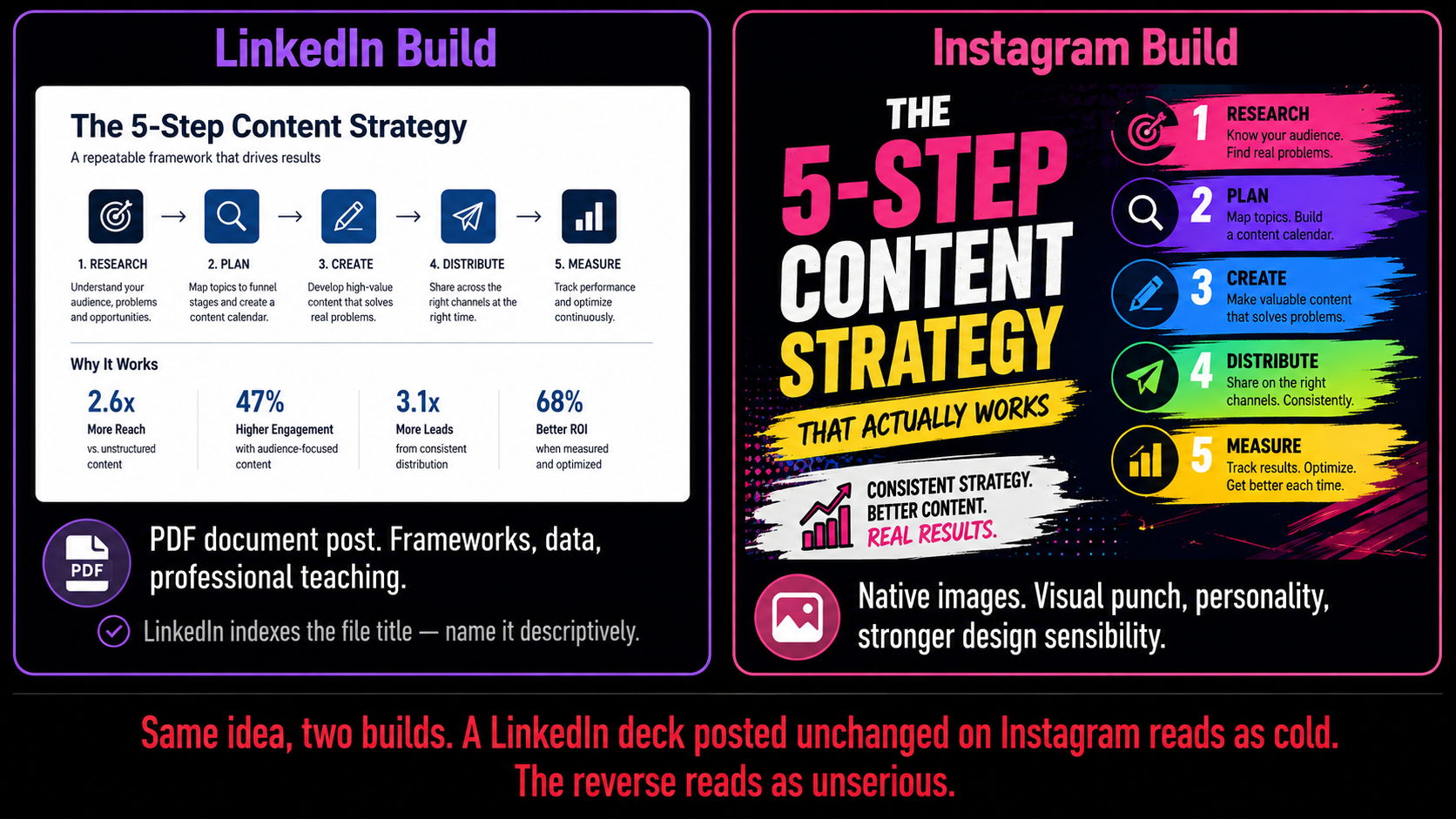
| LinkedIn format | Export as a PDF document post at 1080×1080 or 1920×1080. LinkedIn indexes the document title, so name it descriptively. |
| Slide design | One idea per slide, roughly 30 words maximum, big high-contrast type for phone screens. |
| The trap | AI makes generic decks fast. LinkedIn’s algorithm penalises low-quality volume, so one strong post beats five forgettable ones. |
Why the Carousel Beats Everything Else
The mechanism is dwell time. A single image is judged in half a second; a text post gets skimmed. A swipeable deck asks the reader to do something, and each swipe is a small act of commitment that tells the platform this content is holding attention. Both algorithms treat held attention as a proxy for quality, and quality earns wider distribution.
There is a second, quieter advantage. Carousels are the most-saved content type on LinkedIn, and saves are among the strongest engagement signals a platform can read — far stronger than a like, because saving something means you intend to return to it. A deck that teaches a framework or breaks down a process gets saved, and saved content gets shown to more people.
LinkedIn adds a mechanical bonus worth knowing: if someone scrolls past your document post without engaging, the platform may show it again starting from slide two. You effectively get a second impression from the same post, which almost no other format offers.
The Numbers, Honestly
| Format | Reported engagement |
|---|---|
| LinkedIn multi-image posts | ~6.6% average engagement rate |
| LinkedIn document carousels | ~6.1%, ahead of video, single image, polls and text |
| Instagram carousels | ~0.55%, the leading Instagram feed format |
Two things to note about those figures. First, the LinkedIn numbers come from a benchmark study of around a million posts across thousands of business pages, so they are solid. Second, the gap between LinkedIn and Instagram percentages is a difference in how each platform calculates engagement, not evidence that Instagram carousels are failing — within Instagram, the carousel is the top performer. Compare formats within a platform, never across.
The Structure That Works
Almost every high-performing deck follows the same shape, and it is worth learning because it works on both platforms.
Slide 1: The Hook STOP THE SCROLL
Your entire post lives or dies here. Name a problem your reader actually has, or make a claim specific enough to be interesting. Spend disproportionate time on this one slide — a weak hook means the other nine were never seen.
Slide 2: The Proof EARN THE SWIPE
Give a reason to keep going: a number, a result, a credential, or a surprising fact. This is where you convert curiosity into commitment. It also matters because LinkedIn may re-serve the carousel from this slide.
Slides 3–8: One Idea Each DELIVER
Strict rule: one idea per slide, around 30 words maximum. Cramming two thoughts onto a slide is the most common design failure. Break a process into steps, a framework into parts, or a mistake list into individual mistakes.
Final Slide: The Ask CONVERT
Without a clear call to action, engagement falls off a cliff after the last slide. Ask for the save, the follow, the comment, or the click. One ask, stated plainly, not four competing ones.
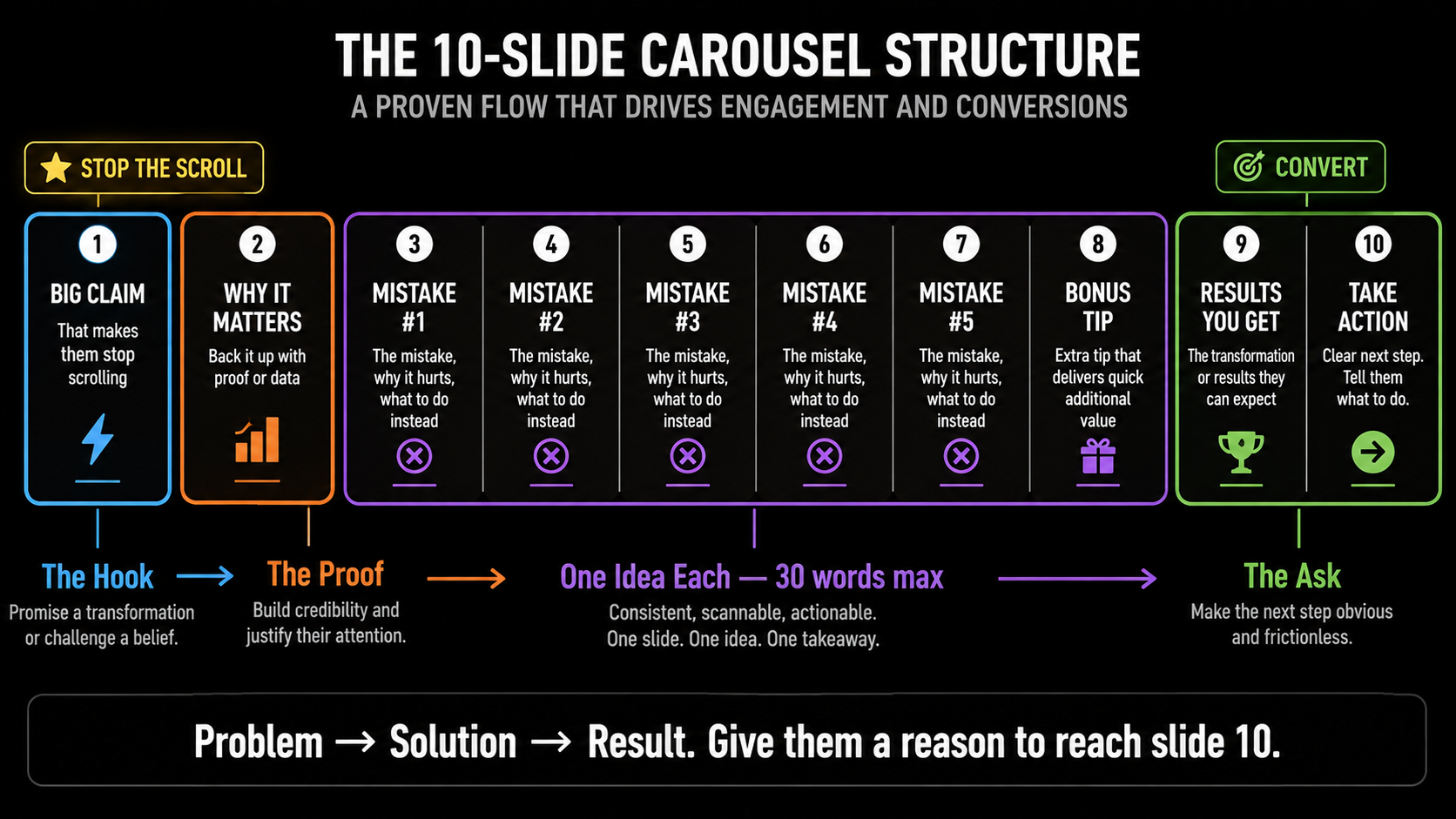
A useful framing device for the whole deck is problem, solution, result. Open on the pain, walk through the fix, end on what changes. That arc gives the reader a reason to reach the last slide instead of abandoning at slide four.
Design Rules for Phone Screens
Nearly all of this is consumed on a phone, and most design failures here are readability failures rather than aesthetic ones.
- Big type. Tiny fonts are the number one killer. If you cannot read it at arm’s length on your own phone, it is too small.
- High contrast. Dark text on light, or light on dark. Low-contrast pastel decks look elegant on a laptop and vanish on a phone in sunlight.
- About 30 words a slide. This is not a document. If a slide needs a paragraph, it needs to be two slides.
- Consistent design. Random font and colour changes read as unprofessional. Build a template and reuse it, so your posts become recognisable.
- Correct dimensions. Blurry or cropped slides destroy credibility instantly. Design at 1080×1080, or 1920×1080 for landscape LinkedIn documents.
Instagram and LinkedIn Are Not the Same
Where AI Actually Helps
The bottleneck in producing these has never been design. It is idea generation and the grind of laying out ten slides. That is exactly where AI earns its place.
1. Filling the Topic Bank IDEAS
Keep a running list of swipe-worthy topics drawn from client questions, observations, and your own work — and use AI to expand it. Idea generation, not design, is what stops most people posting consistently.
2. Drafting the Slide Arc OUTLINE
Have AI break your topic into a slide-by-slide outline before you open any design tool. Getting the structure right on paper saves you from redesigning slides because the argument did not flow.
3. Writing Tight Slide Copy COPY
Compressing an idea into 30 words is genuinely hard, and AI is good at it. Draft the headlines and supporting lines in a document first, then design. Editing text inside a design tool is where hours disappear.
4. Generating Visuals and Backgrounds IMAGERY
Custom illustrations, background textures, and on-brand imagery for each slide, without stock-photo sameness. This is where your slides start looking like yours rather than a template everyone else is using.
5. Hook Variations TESTING
Generate fifteen versions of slide one and pick the two that would genuinely stop your own scroll. Given how much rests on the hook, this is the highest-leverage minute of AI use in the whole workflow.
6. Regional-Language Versions INDIA
Take a deck that performed and produce a Hindi or regional-language version. Same insight, a new audience, and very little extra work — an advantage Indian creators are still under-using.
Formats That Suit the Swipe
Not every idea belongs in this format. The ones that work share a quality: they unfold naturally, so each slide reveals something the last one set up. These five are the reliable workhorses.
- The step-by-step breakdown. Take a process — setting up a tool, filing a return, running a campaign — and give one step per slide. Immediately useful, heavily saved.
- The framework. A named model or method with each component explained. These get saved and referenced, which is the strongest signal you can earn.
- The mistake list. Common errors in your field, one per slide, each with the fix. Easy to write, easy to read, genuinely helpful.
- The before and after. A transformation with the reasoning shown along the way. The curiosity gap carries readers to the end.
- The data breakdown. A statistic or finding, unpacked into what it means and what to do about it. Original numbers perform especially well.
What these have in common is that they teach something quickly. A deck that delivers a genuine lesson in ten swipes earns the save; one that delivers a motivational quote earns a scroll. That difference is the entire gap between the posts that work and the ones that quietly disappear.
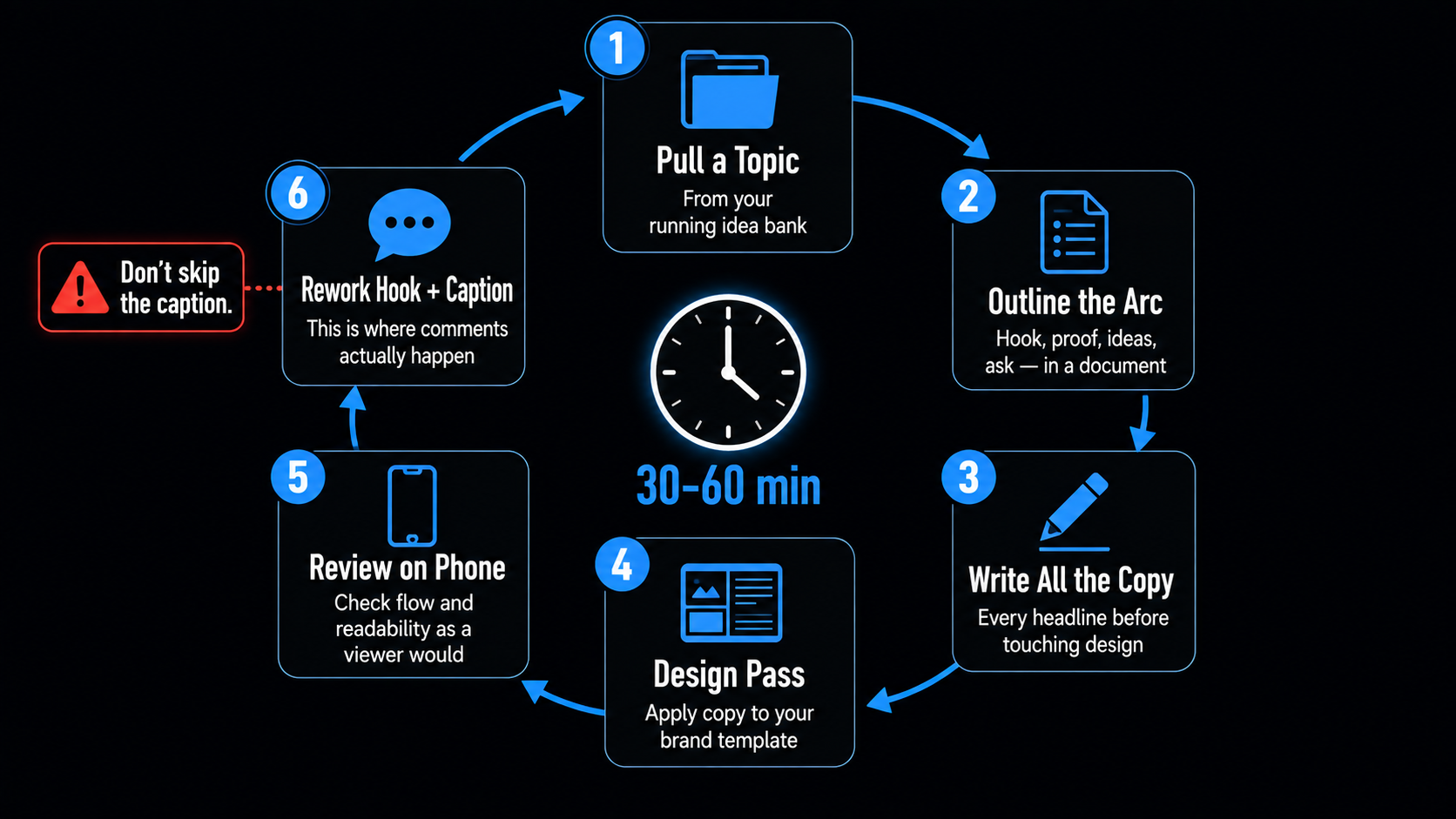
The Workflow That Takes 30 Minutes
Once you have a template system, a good deck takes half an hour to an hour. The order matters more than the tools.
- Pull a topic from your bank rather than starting from nothing.
- Outline the slide arc in a document — hook, proof, ideas, ask.
- Write all the copy before touching design. Every headline and supporting line.
- Design pass — apply the copy to your brand template.
- Review as a viewer would see it, on a phone, checking flow and readability.
- Rework the hook and write the caption, which is where comments actually happen.
The Honest Limit of AI Carousel Generators
The other structural point is frequency. On LinkedIn, company pages are generally advised to post three to five times a week, because more frequent posting makes your content compete with itself in followers’ feeds. Personal profiles have more latitude, but only while quality holds. Whatever the platform, the constraint in 2026 is quality per post, not posts per week.
For Indian Creators and Businesses
Two specific openings here. LinkedIn has grown enormously as a professional network in India, and a large share of Indian LinkedIn content is still text posts and reshared links, which means the carousel format is comparatively uncontested. A consultant, agency, or B2B founder posting genuinely useful decks stands out faster here than in more saturated markets.
The second is language. A deck explaining GST for small business owners, or a hiring framework, in Hindi or a regional language faces almost no competition, and the format suits translation well because each slide is short. Produce the English version, then generate the regional one. For more on the visual production side, our AI image generator guide covers the models behind this kind of work.
Where AIClips Fits
Our lane needs stating precisely, because this is a category where it would be easy to overclaim. AIClips is not a slide layout tool and it does not export multi-page PDFs for LinkedIn document posts — for assembling and exporting the deck itself, Canva, Figma, or a dedicated carousel maker will serve you better, and that is the honest recommendation.
What AIClips does is the imagery inside the slides: custom illustrations, backgrounds, product visuals, and on-brand graphics that stop your carousel looking like the same template as everyone else’s, plus video versions of a deck for Reels, across 461 models in one dashboard at ₹349/month with UPI. Generate the visuals here, lay them out there.
The Bottom Line
The swipeable post is the rare format where the mechanics are genuinely in your favour. It holds attention by design, it earns saves, and on LinkedIn it can even get a second showing. Meanwhile most competitors are still posting plain text and reshared links.
Use AI for the parts that stop you publishing — topics, outlines, tight copy, and original visuals — and keep the parts that make it worth reading. Nail slide one, one idea per slide, big readable type, a clear ask at the end, and a caption that invites a real conversation. Do that consistently and the carousel remains the most reliable organic format available to a small brand in 2026.
Frequently Asked Questions
How many slides should a carousel have?
Why do carousels get more engagement than video?
Should I post the same carousel on Instagram and LinkedIn?
How do I upload a carousel to LinkedIn?
Are AI carousel generators worth using?
Can AIClips make my carousel?
Make Your Slides Look Like Nobody Else’s
Custom illustrations, backgrounds, and on-brand visuals for every slide — 461 models in one dashboard. From ₹349/month.
Start on AIClips →