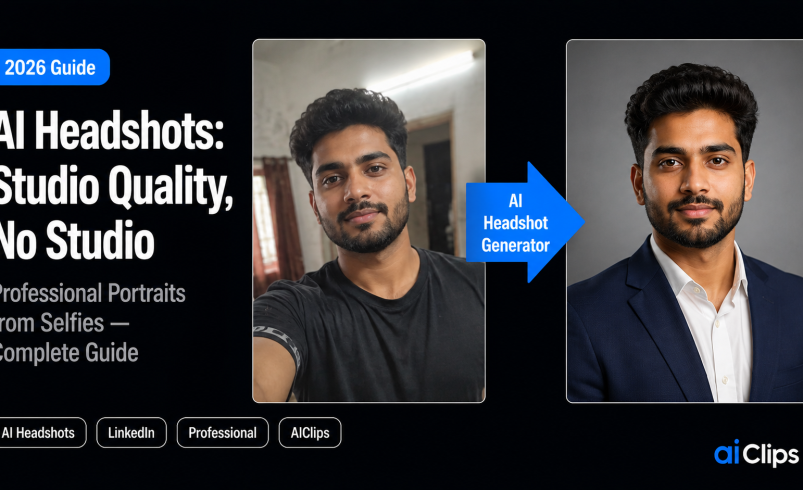

Your profile photo is the fastest judgement anyone makes about you online. A visitor decides whether you look credible before they read a single word of your headline. Yet most people are still using a cropped wedding photo or a five-year-old selfie, because booking a real studio costs money and an afternoon nobody has. AI headshots close that gap. In 2026 they look genuinely professional, cost a fraction of a photographer, and are ready in about an hour. This guide covers how they work, how to get ones that actually look like you, and the honest catches.
I will say the important part now, because it is the part most tool ads skip: the goal is not a photo that looks real. Every tool can do that. The goal is a photo that looks real and unmistakably like you. Get that right and nobody can tell it was AI.
| What it is | You upload a few selfies, the tool learns your face, and it returns dozens of studio-style portraits in different outfits and backgrounds. |
| Quality in 2026 | At profile-photo resolution, recruiters and clients cannot tell AI headshots from a real studio shoot. |
| The one thing that matters | Likeness. Judge a tool on how many photos actually look like you, not on how polished they are. |
| Cost | A studio runs ₹8,000–₹35,000. Good AI headshots cost from free to around ₹3,500. |
| The impact | LinkedIn’s own data links a professional photo to 14x more profile views and 36x more messages. |
What an AI Headshot Generator Actually Does
An AI headshot generator takes a handful of your existing photos, learns what your face looks like, and produces new portraits of you in settings you never actually sat for. You upload the selfies, pick the styles you want, and a little while later you get back a batch of clean, well-lit, professional shots in different outfits and backgrounds. No photographer, no studio, no awkward posing in front of a stranger.
The clever part is that the tool trains a small model on your face first, which is why the good ones can keep your features consistent across dozens of images. That is also why AI headshots are so much more flexible than a real shoot. A studio session locks you into whatever worked on that one day, in that one shirt. A generated set lets you have a corporate look, a creative look, and a casual look from the same upload.
Are AI Headshots Good Enough in 2026?
Short answer: yes, and it is not close anymore. The early days of smoothed, waxy, slightly-off AI faces are behind us. Modern tools produce portraits that, at the resolution people actually view a LinkedIn or resume photo, are indistinguishable from studio photography. Recruiters, hiring managers, and clients cannot reliably tell the difference, and the ones I have shown people to could not pick the AI shot out of a line-up.
The reason this matters so much is that the photo does real work. According to LinkedIn’s own data, profiles with a professional headshot get around 14 times more views and 36 times more messages than those without. That is an enormous return on a photo, and AI headshots put that quality within reach of anyone, not just people who can spend on a shoot.
But hold onto the honest bit. The question that separates a good tool from a forgettable one is not “does this look real.” It is “how many of these actually look like me.” Every generator hands back some duds where the face drifts. Your job is to judge on likeness and keep only the ones that are truly you.
What AI Headshots Cost
This is where the maths gets fun. A decent professional studio session in India runs anywhere from ₹8,000 to ₹35,000, plus the time to book it, travel to it, and hope you look your best that day. AI headshots range from genuinely free to around ₹3,500 for a large, high-resolution batch.
| Option | Approx cost | What you get |
|---|---|---|
| Studio photographer | ₹8,000–₹35,000 | A handful of shots from one session, one day, one look |
| Free AI tools | ₹0 | A few usable headshots, lower resolution, good for testing |
| Paid AI headshots | Up to ~₹3,500 | Dozens to hundreds of high-res portraits across many looks |
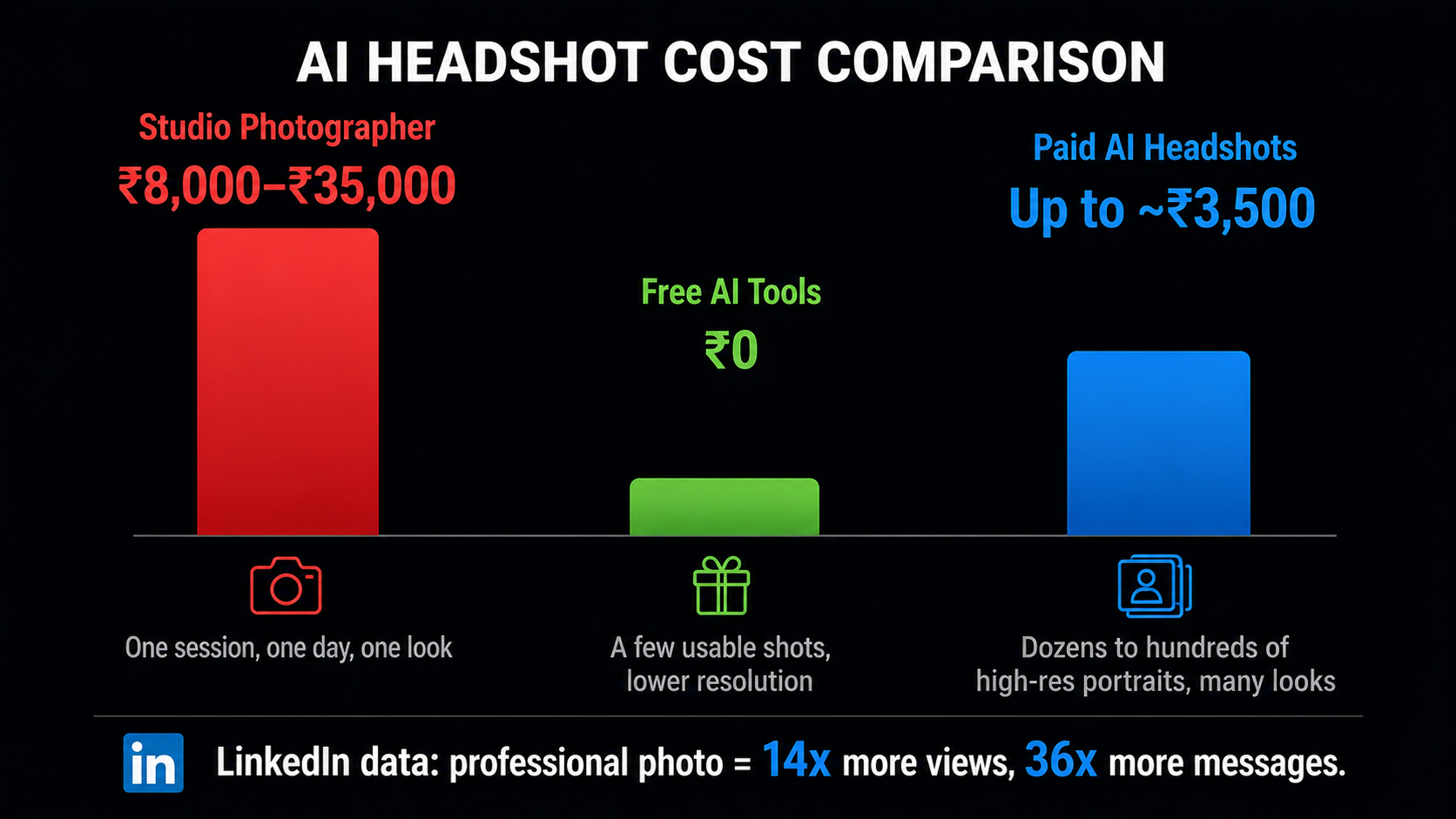
One thing worth paying for is resolution. Cheaper tools sometimes hand back small files that look blurry and cheap on a desktop screen. If you want a photo that holds up as a website header or a large profile image, choose a tool that exports high resolution. It is also worth checking how a tool charges before you commit: some bill a one-time fee per batch, some run monthly subscriptions, and a few genuinely useful free tiers exist for a quick test. If you only need a photo once a year, a one-time option makes more sense than a recurring plan you will forget to cancel.
How to Get Great AI Headshots
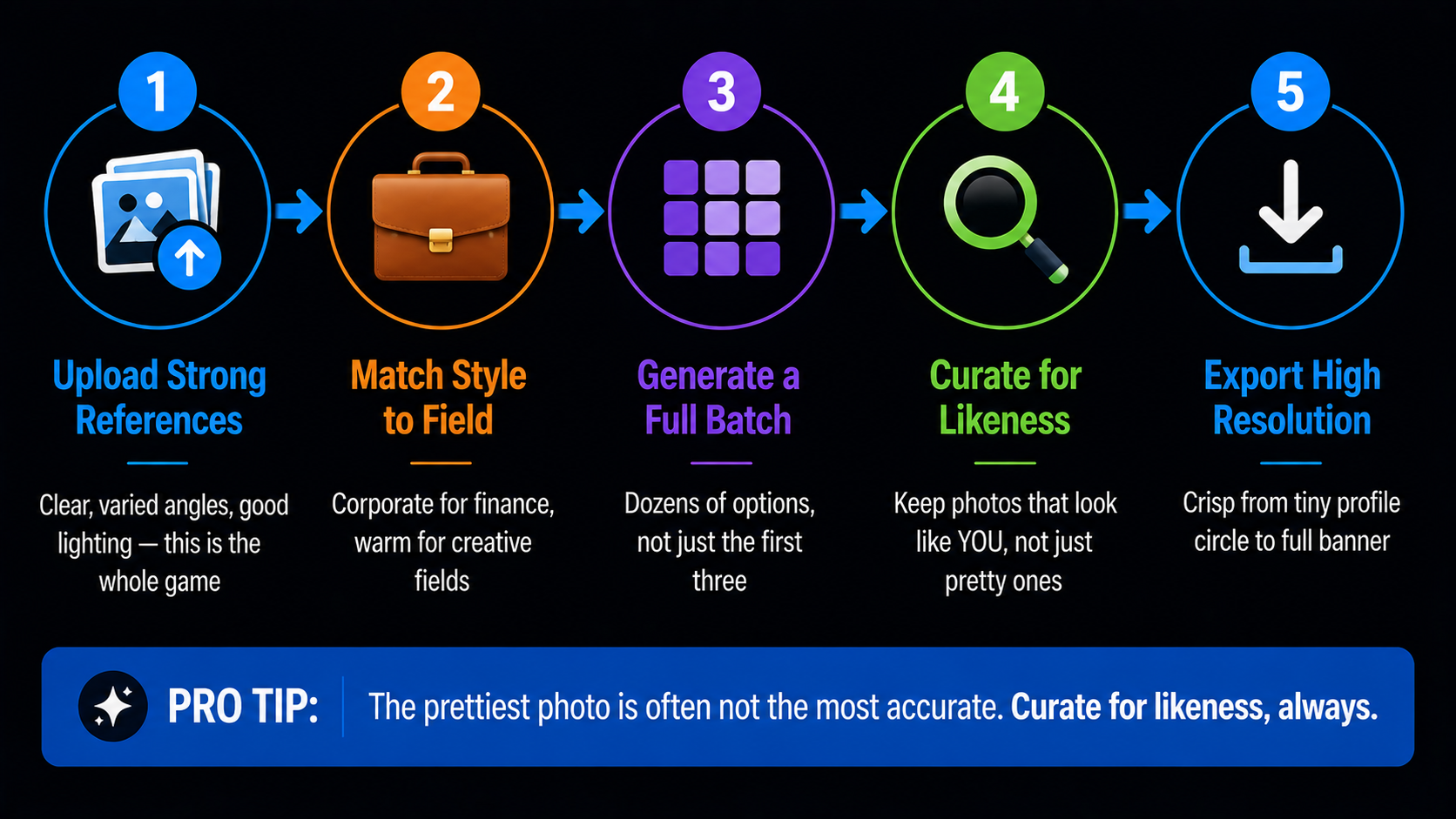
The tool matters less than what you feed it. Follow these steps and your hit rate goes way up.
1. Upload Strong Reference Photos INPUT
This is the whole game. Garbage in, garbage out. Give the tool a variety of clear, recent, well-lit photos of your face from a few angles, with different expressions. The quality of your AI headshots is decided here, before you generate a single image.
2. Match the Style to Your Field STYLE
A banker and a designer should not pick the same look. Choose backgrounds and attire that fit how your industry expects to see you. A crisp corporate style reads as credible in finance or consulting; a warmer, creative style suits founders and creators.
3. Generate a Full Batch GENERATE
Let the tool produce plenty of options, often dozens or more. More outputs mean more chances of landing the few that are genuinely great. Do not judge from the first three; look at the whole set.
4. Curate for Likeness, Not Polish CHOOSE
Go through the batch and keep only the photos that look like you, not just the prettiest ones. A gorgeous shot that is subtly someone else is useless. This curation step is where a good final photo is really made.
5. Export High Resolution FINISH
Download your chosen shots at the highest resolution the tool allows, so they stay crisp everywhere from a tiny profile circle to a full website banner. Then use the same photo across your profiles for a consistent presence.
The Reference Photos That Make or Break It
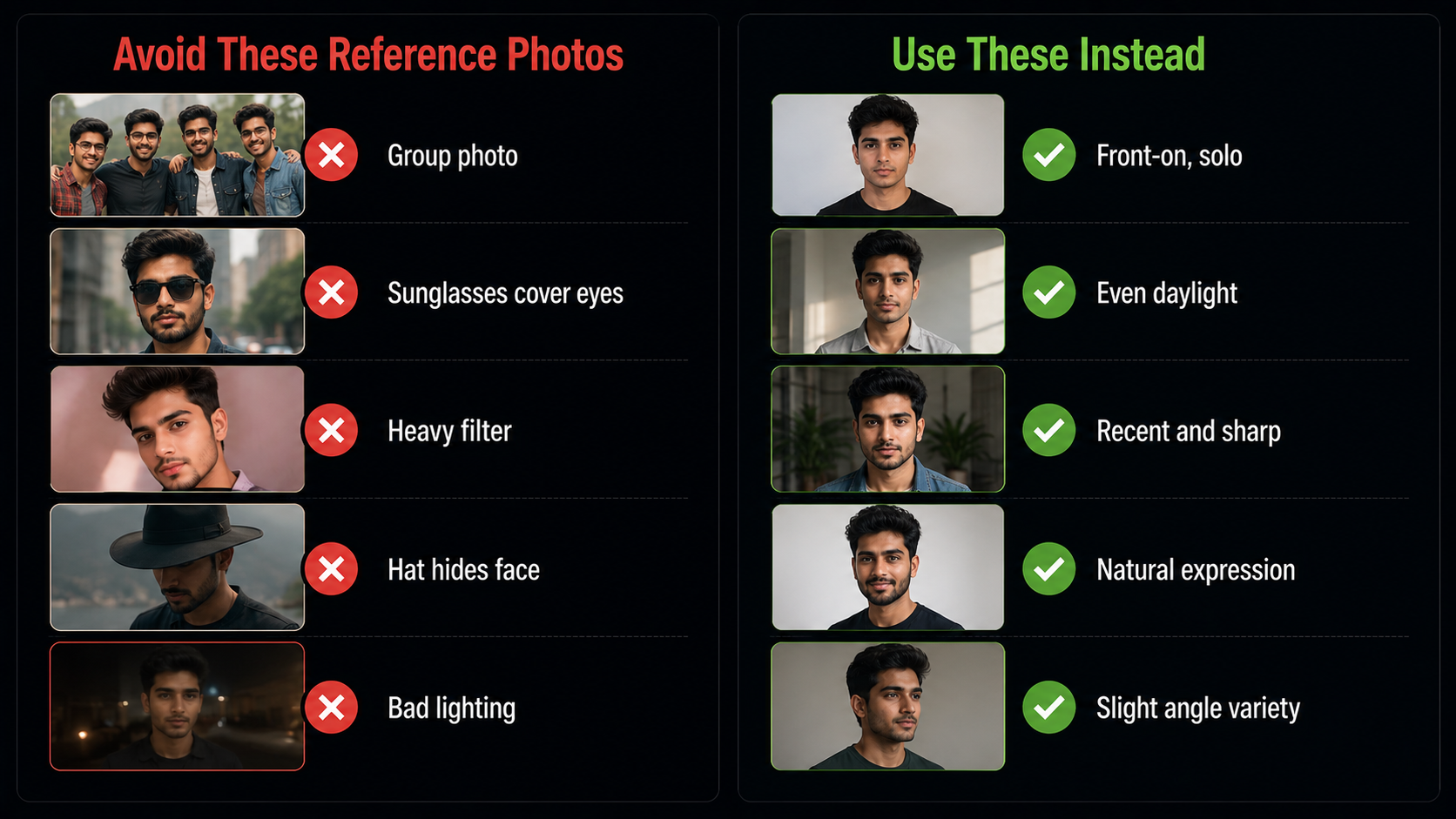
Since your input decides your output, it is worth getting specific about what to upload. Spend five minutes gathering the right source photos and you will save yourself a frustrating batch of near-misses.
- Variety of angles. Front-on and a few slight turns, so the model learns your whole face, not one frozen pose.
- Good, even lighting. Natural daylight is ideal. Harsh shadows and dim rooms confuse the model.
- Recent and clear. Photos that actually look like you now, in focus, filling a decent part of the frame.
- Different expressions. A neutral face, a slight smile, a fuller smile. This gives the tool range to work with.
- Avoid the traps. No group photos, no sunglasses, no heavy filters, no hats that hide your face. These are the most common reasons AI headshots come back looking off.
The Honest Limits You Should Know
None of this is a reason to avoid AI headshots. It is a reason to use them with a little care. The people who get burned are the ones who grab the first shiny image without checking whether it is accurate, high-resolution, and actually them.
5 Mistakes That Ruin AI Headshots
Most disappointing results come from the same handful of avoidable errors, not from the tool being bad. Sidestep these and your first batch will be far more usable.
- Uploading weak source photos. Blurry, dim, or heavily filtered inputs produce blurry, off-looking outputs. The reference set is everything.
- Accepting the first pretty image. The prettiest shot is often not the most accurate. Slow down and curate for likeness.
- Over-smoothing. Cranking every “enhance” setting gives you that plastic, too-perfect look that reads as fake. Aim for natural.
- Picking a style that fights your field. A hyper-corporate look on a creative profile, or vice versa, quietly undercuts you. Match the room you are walking into.
- Ignoring resolution. A low-res file looks cheap the moment it is bigger than a thumbnail. Export the highest quality available.
Avoid those five and the difference is night and day. Good AI headshots are less about finding a magic tool and more about feeding it well and choosing carefully at the end.
For Indian Professionals Specifically
The use cases here go well beyond LinkedIn, though LinkedIn alone is reason enough given how many freshers and IT professionals live on it. AI headshots are quietly perfect for a few very Indian situations. Job seekers and students can put a polished, professional face on a resume without spending on a studio. Founders and creators can build a consistent personal brand across platforms. Startup teams can get matching, on-brand headshots for an About page in an afternoon. And matrimonial profiles, where a good photo genuinely matters, are a use case most global guides never think to mention.
The cost difference lands even harder in rupees. Skipping an ₹8,000-plus studio session for a set of professional portraits that cost a fraction of that, and that you can regenerate any time your look changes, is the kind of practical, money-saving use of AI that suits Indian creators and professionals. If you want the broader toolkit, our AI image generator guide covers the models behind this and much more.
AI Headshots vs a Real Photographer
Let me be even-handed here, because AI headshots are not the right answer for every single situation, and pretending otherwise would be dishonest. There are still moments when a human photographer wins, and knowing the difference saves you from a bad call.
AI wins on volume, variety, speed, and price. If you need forty usable shots across three different looks by tomorrow, without booking anyone or spending ₹15,000, this is the obvious choice. It is also the better option for a whole team that needs consistent, on-brand portraits, or for anyone who simply hates being in front of a camera. The flexibility is the quiet superpower: you can regenerate a fresh set the moment your hair, your glasses, or your role changes.
A photographer still wins when the shoot itself is the point. A magazine feature, a founder portrait for a funding announcement, a campaign where the exact mood and location matter, an art-directed brand shoot — these want a human eye on set and a real moment captured. If your photo needs to carry a specific story rather than just present you cleanly, pay the photographer.
For the everyday reality of most professionals, though — a LinkedIn photo, a resume, a Slack avatar, a team page, a matrimonial profile — AI headshots are not the compromise choice anymore. They are the sensible default, and the photographer is the occasional upgrade for special occasions.
Where AIClips Fits
On AIClips you can generate professional AI headshots with ImageGen, alongside the rest of your visual content, in one dashboard billed in rupees at ₹349/month with UPI. The same account that makes your thumbnails, product shots, and videos can make your profile photo, which keeps everything in one place instead of a separate subscription for every job. As with any headshot tool, the rule stays the same: generate plenty, then keep only the ones that look unmistakably like you. If you also sell products, our product shot guide is the natural companion for the same approach applied to things instead of faces.
Frequently Asked Questions
Are AI headshots good enough for LinkedIn in 2026?
How much do AI headshots cost in India?
How many photos should I upload?
Will people know my photo is AI-generated?
Are AI headshots safe for my privacy?
Can I make AI headshots on AIClips?
Make Your AI Headshots on AIClips
Professional portraits with ImageGen, plus 460 other models for your whole content workflow. INR pricing, UPI, from ₹349/month.
Start on AIClips →