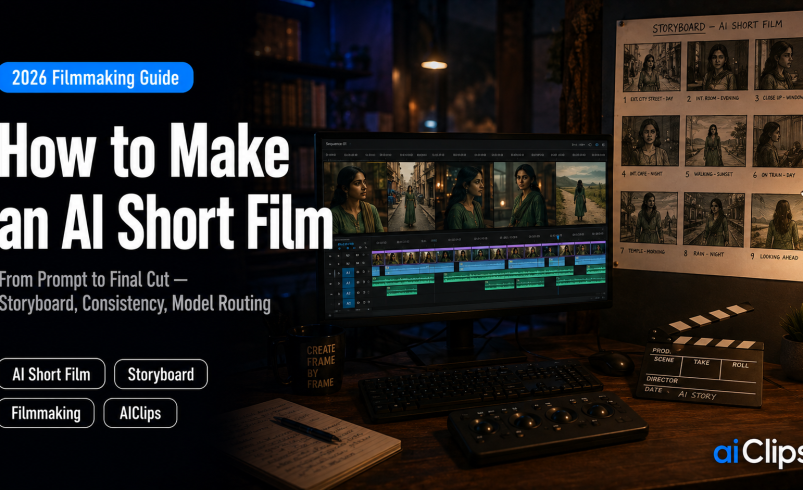

A filmmaker with no crew, no camera, and no location permits can now finish a watchable short film over a weekend. That is not a marketing claim — documented productions are wrapping in two to five days. But an AI short film that actually holds an audience is not made by typing a scene into a video model and hoping. It is made by following an order of operations, locking your characters before you generate motion, and routing each shot to the model that handles it best. This guide is that process, including the mistake that quietly burns most people’s credits.
The single most useful thing I can tell you up front: storyboard in still images before you generate a single second of video. Images cost cents. Video costs real money. Almost every blown budget in AI filmmaking traces back to skipping that step.
| Order of operations | Narrative → visual language → motion → audio → post. Break the order and you re-roll the same shot ten times. |
| The consistency fix | Lock a character reference image and reuse it on every shot. Never rely on text like “the same woman” — models drift. |
| No single winner | Route shots by model strength: cinematic look, human motion, wide landscapes, atmosphere. Anchor to your script, not one tool. |
| Realistic volume | A 90-second short can consume hundreds of video generations. Budget for iteration, not one perfect take. |
| Right length | Most first films land at 30–90 seconds. That is the correct length. Do not pad it. |
What Changed: Films, Not Clips
For a couple of years, making a short film with AI meant generating a single beautiful clip and calling it done. The 2026 shift is that models can now produce coherent multi-shot sequences with consistent characters, native synchronised audio, and real camera work. Reference-driven modes let you carry a character and a location across segments, which is what makes a continuous scene possible instead of a collage of unrelated pretty shots.
That is the difference between an experiment and an AI short film. The technology stopped being about the individual shot and started being about continuity, which is exactly what storytelling requires. Sound matters here too: several leading models now generate synchronised dialogue, effects, and score alongside the picture, so audio is no longer a separate scramble at the end.
The Order of Operations
This is the backbone of every short film workflow, and it is where beginners go wrong. Work in this sequence: narrative first, visual language second, motion third, audio fourth, post last. Skip ahead and you will regenerate the same shot repeatedly, trying to fix a problem that started upstream.
| Stage | What you do | Why it comes here |
|---|---|---|
| 1. Narrative | Write the script and shot list | The script is the canonical project; every shot indexes back to it |
| 2. Visual language | Character sheets, style, palette, storyboard stills | Boards cost cents and decide composition and continuity |
| 3. Motion | Image-to-video from your approved stills | The image dictates the look, so the prompt only dictates movement |
| 4. Audio | Voice, score, effects | Cut to the rhythm of sound, not the other way round |
| 5. Post | Edit, grade, titles, export | An editor turns clips into a film |
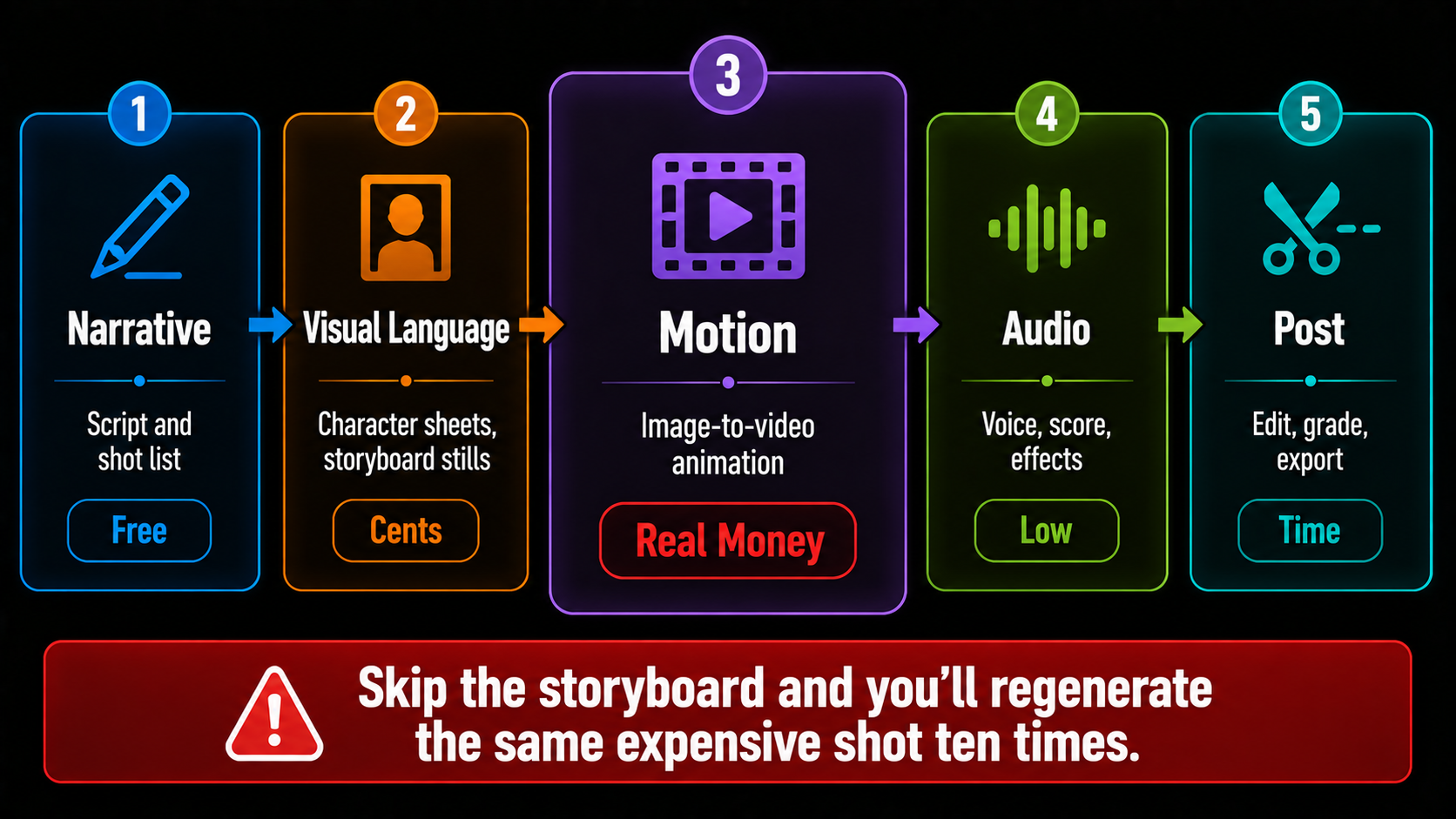
The economic logic behind that order deserves spelling out. Generating motion from un-boarded, unstructured scenes is how budgets disappear into re-rolls. A storyboard image is cheap enough to throw away; a ten-second video generation is not. So make all your composition and continuity mistakes at the still-image stage, where they cost almost nothing to fix.
Character Consistency: The Real Skill
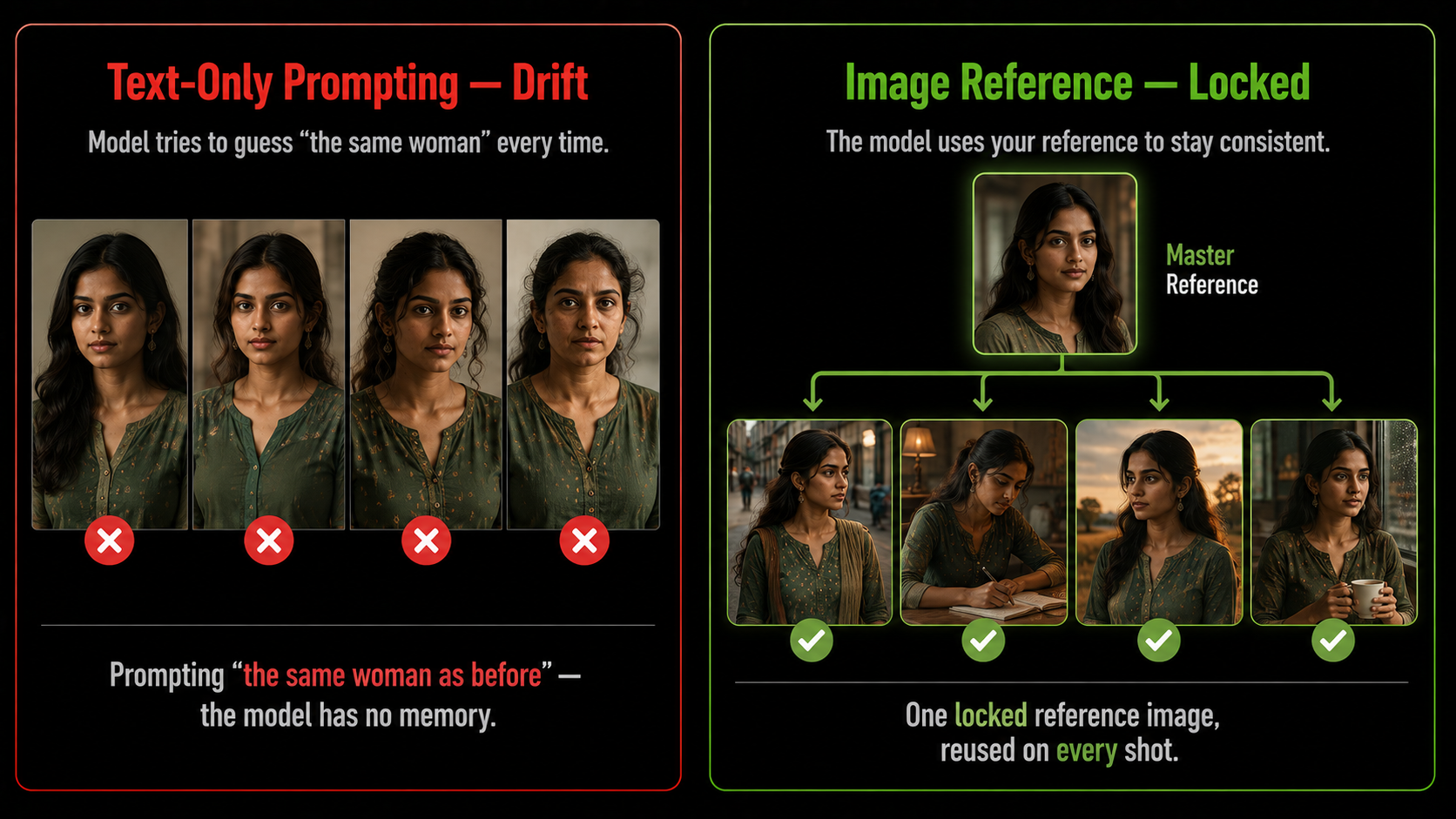
Character drift is the most pervasive problem in short film work with AI. You create a protagonist, and by scene four she has a different nose, different hair, and a different age. Nothing breaks the illusion of an AI short film faster.
The fix is now well established. Lock your character’s identity in a single clean reference image first — a well-lit, front-facing portrait works best — then reuse that exact reference on every subsequent shot rather than re-prompting from scratch. Build a multi-angle character sheet, so the model has your character from the front, the side, and three-quarters. Several models support uploading three or four reference images of your character and setting to pin those identities in place, which is what keeps the actor in scene one identical to the actor in scene five.
Route Your Shots to the Right Model
After skipping the storyboard, the next expensive habit is trying to make an entire AI short film on one platform. No single model in 2026 is best at everything, and professional workflows treat model choice as a per-shot routing decision.
| Shot type | Reach for |
|---|---|
| Multi-shot scene with references | Seedance 2.0 — reference-driven, multi-shot, native audio in one pass |
| Cinematic close-up, premium look | Veo 3.1 — highest cinematic quality, 4K, native synchronised audio |
| Human movement and emotion | Kling — the most natural walking, gesturing, and facial expression |
| Wide establishing landscape | Wan — environmental scale and big cinematic vistas |
| Tension and atmosphere | Hailuo — contrast and mood for horror and thriller beats |
| Character reference stills | Midjourney, Flux, Nano Banana, or Recraft for your boards |
Routing only works if the short film is anchored to your script rather than to one model’s output. Keep the screenplay as the source of truth, index every board and clip back to a scene, and you can swap models per shot without losing the film. Anchor to a tool instead and you end up rewriting the story around whatever that tool happens to produce.
The Step-by-Step Workflow
1. Write a Tight Script STORY
A thirty to ninety second short film means one clear idea, a turn, and an ending. Write it properly, then break it into a numbered shot list with the framing and intent for each shot. Your AI short film is only as good as this document.
2. Build Character Sheets LOCK
Generate your protagonist as a clean portrait, then produce multiple angles of the same face. Do the same for key locations. Save these as your permanent references. Everything downstream depends on this folder.
3. Storyboard Every Shot as a Still BOARD
Generate a still for each shot in your short film, using your character reference. Establish the palette, lighting, and grade here. When the stills look like one coherent film rather than random clips, you are ready to animate — and not before.
4. Animate With Simple Prompts MOTION
Feed each approved still into a video model in image-to-video mode. Because the image already dictates the look, your text only needs to describe movement: “slow cinematic dolly push forward, subtle wind in her hair.” Do not write a novel here.
5. Generate Variants and Select ITERATE
Your first generation is almost never the keeper. Run several variants per shot and choose on motion quality, subject coherence, and — the criterion people forget — how well it will cut next to the shots either side of it.
6. Build the Audio SOUND
Add voice, score, and effects. Even where a model generates native audio, finishing the sound in an editor gives you control over levels and timing. Sound is half of what makes an AI short film feel finished, and it is the half most people rush.
7. Edit Like a Filmmaker POST
Drop your short film into an editor, trim to the rhythm of the music, grade for consistency, and add titles. This is where a pile of clips becomes a film. Cut ruthlessly — if a beautiful shot does not serve the story, lose it.
Prompting for Motion, Not Description
Once your stills are locked, video prompts get shorter, not longer. The image is carrying the look, so your job is to specify movement and camera. Compare these two and you can see why the second one is what experienced creators write.
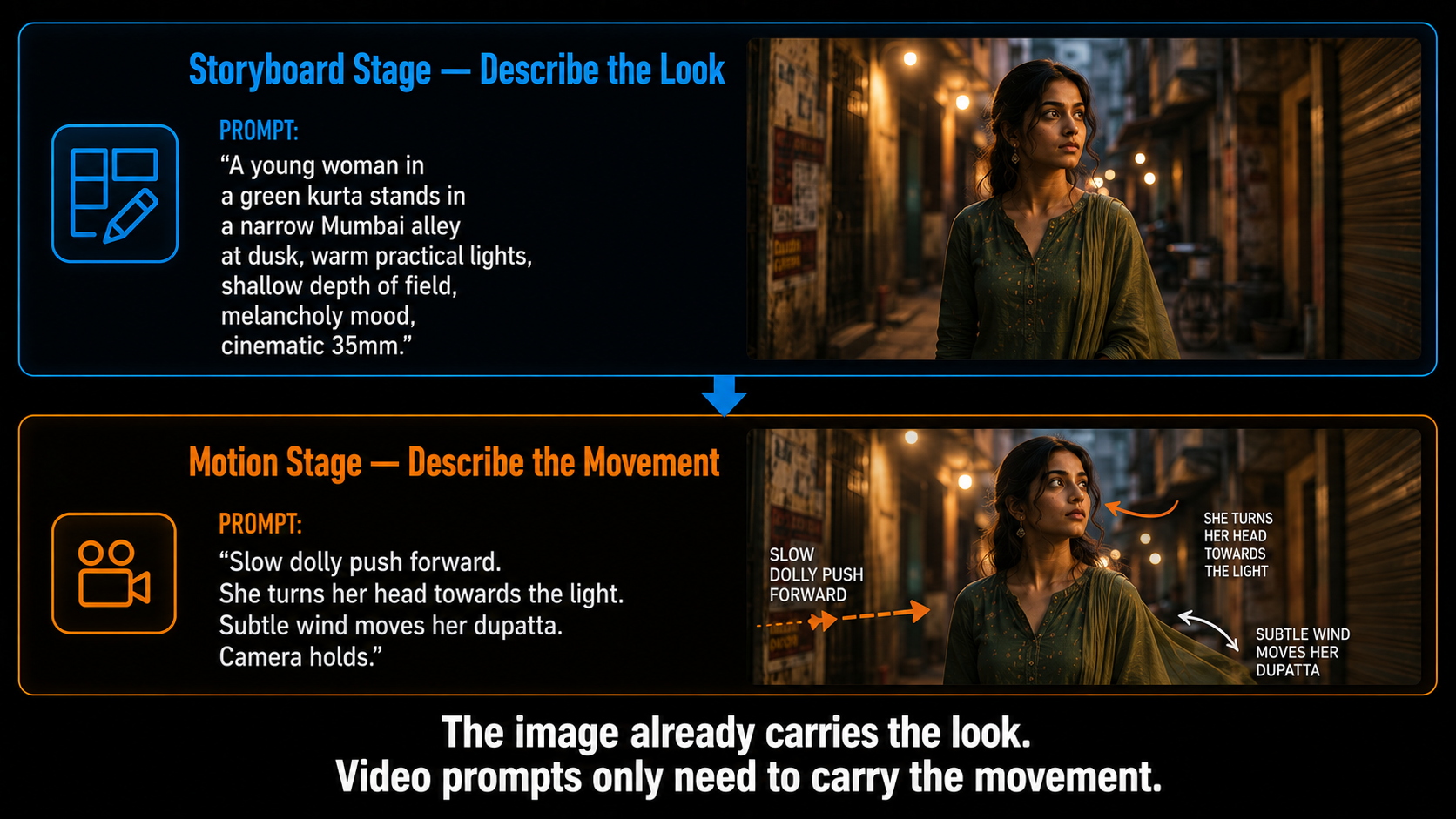
The first prompt belongs at the storyboard stage, where you are generating the still. The second belongs at the motion stage, where the still already exists. Getting that split right is one of the fastest ways to improve your output, because you stop asking the video model to re-invent a look you had already perfected.
Budget Reality
Two honest numbers to set expectations for your first short film. First, iteration volume: a 90-second short can consume several hundred video generations by the time every shot works. Plan credits for exploration, not for a single perfect take. Second, the floor is lower than you would think — a workable stack of a free chat model for scripting, a low-cost image tool for boards, free daily video credits, free voice and music tiers, and a free editor gets you roughly 80% of a fully paid pipeline for about the price of one dinner and a weekend of work.
The gap between the cheap short film stack and the expensive one shows up mainly in complex camera moves and shot coherence. For a first AI short film, that gap does not matter. Make the cheap one, learn the workflow, and spend money only where you have identified a specific limitation.
Rights, Festivals, and Honesty
Two practical matters before you publish. On commercial rights, most paid tiers of the major image, video, voice, and music tools grant commercial use of your output, but terms differ by tool and by plan, so check the specific plan you generated on rather than assuming. This is general information rather than legal advice.
On festivals, a growing number of events now ask about AI use, and some have specific disclosure requirements or dedicated AI categories. Read the rules before submitting, and declare your process honestly. There is a real and growing audience for AI filmmaking, and the creators building lasting reputations are the ones open about their method rather than implying a crew that never existed.
For Indian Filmmakers
The short film is arguably the most exciting application of AI for creators here, because the barrier it removes is the one that has always been decisive. A short film with a period setting, a village exterior, a crowd scene, or a fantasy sequence was simply out of reach for a young Indian filmmaker without funding. Location permissions, crew, and equipment made ambition expensive. Now the ambitious idea costs the same as the modest one.
There is a specific creative opening too. Indian mythology, regional folklore, and period stories are visually rich and chronically under-produced because they are costly to shoot. An AI short film can put those on screen at a scale that used to need a studio. Add native-language dialogue and score, and you have work that no global creator is making. If you want the model-by-model detail behind this, our best AI video generators guide goes deeper on which model suits which shot.
Where AIClips Fits
This is one place where our structure genuinely matches the workflow, so I will explain it plainly rather than overselling. Because a good short film is a routing problem, having Seedance, Veo, Kling and the rest available in one dashboard — alongside image models for your boards, voice for dialogue, and music for score — means you are not holding five subscriptions to make one film. That is 461 models at ₹349/month with UPI, billed in rupees.
What AIClips is not is an editor. You will still cut, grade, and finish in CapCut, Premiere, DaVinci or similar, and you should — the edit is where the film is made. Use us for generation and the whole audio layer; use a proper timeline for post.
Frequently Asked Questions
How long should my first AI short film be?
How do I stop my character changing between shots?
Which AI model is best for short films?
Why do people say to storyboard first?
How much does an AI short film cost to make?
Can I use my AI short film commercially or at festivals?
Make Your Short Film on AIClips
Seedance, Veo, Kling, image models, voice and music — 461 models in one dashboard. INR pricing, UPI, from ₹349/month.
Start on AIClips →