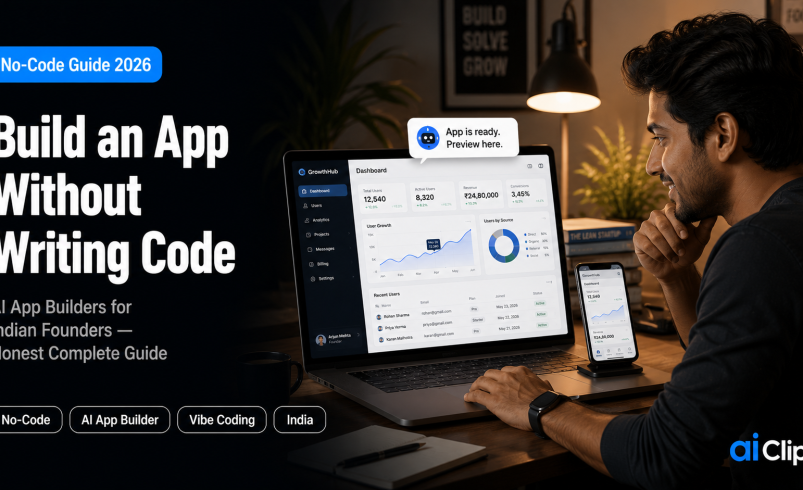

For years, having an app idea and no engineer meant your idea stayed in your head. That wall is gone. A modern AI app builder lets you describe what you want in plain English and watch it become a working application — no computer science degree, no ₹5 lakh developer contract, no six-month wait. This is the honest, complete guide to building an app without code in 2026: what the tools actually do, which to pick, how to build your first one, and the real limits nobody markets to you.
We will be straight with you throughout. These tools are genuinely powerful and genuinely oversold at the same time. Knowing the difference is what separates people who ship a real app from people who collect beautiful demos that never go live.
| What it is | Describing an app in natural language and having AI build it — no manual coding required. |
| Two categories | AI app builders (build from chat, beginner-friendly) and AI code editors (more power, some technical comfort needed). |
| Best for beginners | Lovable, Base44, and Bolt for browser-based building; Replit for an all-in-one platform. |
| The honest catch | Building a demo is easy; getting it to production, with a database and security, is the real work. |
| The market | No-code AI platforms are projected to grow from $4.9B in 2024 to $24.8B by 2029. |
What “No-Code AI App Building” Actually Means
Two phrases get thrown around, and mixing them up costs people time and money. “No-code” traditionally means assembling an app visually, dragging and dropping blocks in a tool like Bubble. “Vibe coding” is the newer idea: you direct an AI to write the actual code for you by describing your intent, and it produces a real application. Both let a non-programmer build software. They just get there differently.
The modern AI app builder sits at the centre of this shift. Unlike old no-code platforms that locked you into a closed visual system, these tools generate real, exportable code — usually React and TypeScript — from a conversation. You describe a feature, the AI app builder builds it, you see it live, and you refine it by chatting. That difference matters: because the output is real code, you can hand it to a developer later to extend, instead of hitting a ceiling and starting over.
So when this guide says “no-code,” it means you personally never write code. It does not mean code stops existing. The AI writes it, and understanding that distinction is the first step to using these tools well rather than being surprised by them.
Why This Matters Now, Especially in India
The economics have flipped. A working prototype that once needed a funded team and months of work can now be built by one determined person in a weekend. The market reflects it: no-code AI platforms are projected to grow from $4.9 billion in 2024 to $24.8 billion by 2029, an annual growth rate above 38%. That is not hype about a feature — it is a change in who gets to build software at all.
For Indian founders, creators, and small business owners, this is enormous. The single biggest barrier to launching a digital product here has always been access to engineering talent and the budget to pay for it. A no-code AI app builder removes that barrier. A shop owner can build an inventory tool, a creator can build a fan-membership site, a solo founder can build an MVP to test an idea before spending a rupee on a developer. The gatekeeping is gone, and the people closest to real problems can now build the solution themselves.
This fits a wider pattern of Indian creators and entrepreneurs building their own tools rather than waiting for someone else to. If that shift interests you, our piece on why Indian creators are building their own AI tools covers the bigger picture.
The Two Categories You Must Understand
Before you pick a tool, you need to know which of two families it belongs to. Choosing the wrong one is the most common early mistake, because a beginner who picks a developer tool hits a wall on day one.
| AI App Builders | AI Code Editors | |
|---|---|---|
| How you work | Chat, describe, preview | Edit code with AI help |
| Skill needed | None to start | Some technical comfort |
| Examples | Lovable, Bolt, Replit, v0, Base44 | Cursor, Claude Code, Copilot |
| Best for | Non-technical founders and creators | More control and complex builds |
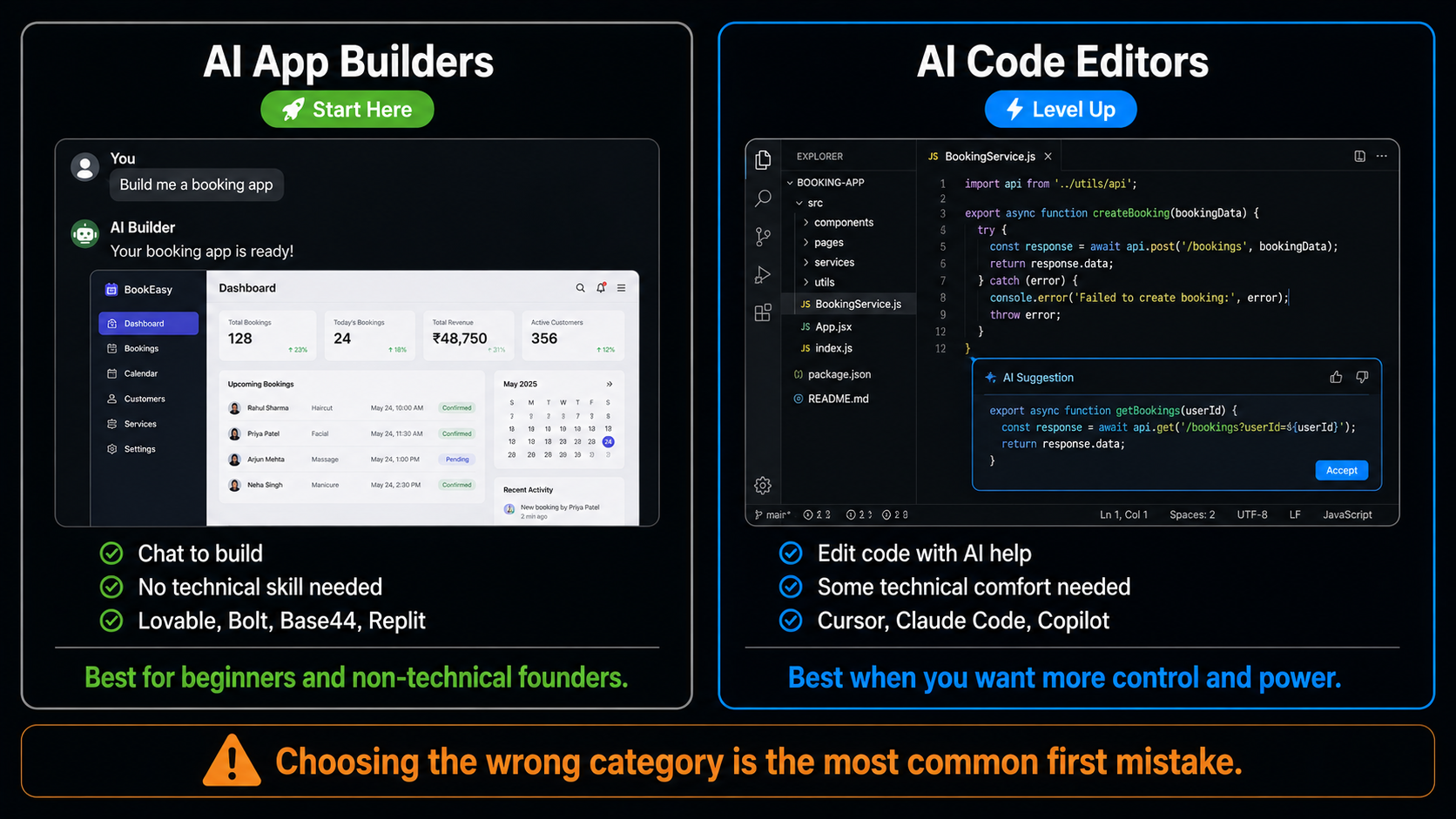
If you have never written a line of code, start firmly in the AI app builder column. You can graduate to a code editor later if you find you want more control — and many people do, because using these tools gently teaches you how software actually fits together. But there is no reason to start on hard mode.
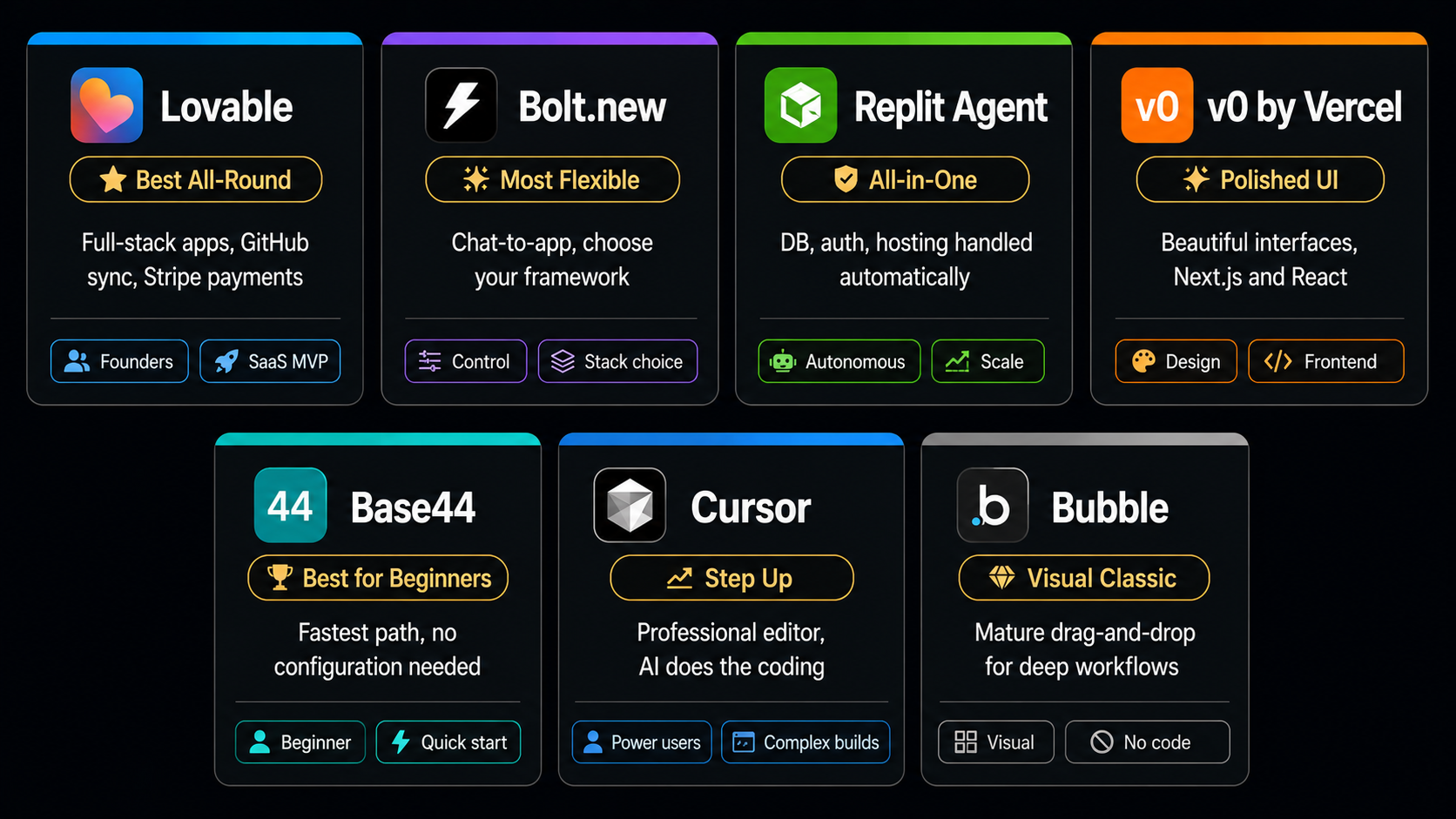
The 7 Best No-Code AI App Builders in 2026
Here are the AI app builder tools worth your time, what each is genuinely good at, and who it suits. Pricing and features change often, so treat these as starting points and check current plans before you commit.
1. Lovable BEST ALL-ROUND
The strongest all-round choice for non-developers building a real product. Lovable produces clean, full-stack applications from conversation, and its standout feature is two-way GitHub sync, which means your code is portable and you are never locked in. It also handles payments through Stripe integration, so an MVP can reach revenue quickly. The one hurdle for absolute beginners is that it asks you to connect an external database, which is a moment where non-technical users sometimes stall. Best for founders building a SaaS MVP who want something they can later hand to a developer.
2. Bolt.new FLEXIBILITY
Bolt offers prompt-to-application building with the most framework flexibility of the group, which makes it a favourite for people who want more say in how the app is structured. Like Lovable, it still expects you to configure external services such as a database, so it leans slightly more technical. Best for someone who wants conversational building but also wants control over the underlying stack.
3. Replit Agent ALL-IN-ONE
Replit is the most autonomous and arguably the most powerful of the browser-based options. It manages the whole stack for you — database, authentication, hosting — with 30-plus integrations, so you are not stitching services together yourself. The trade-off is platform dependency: your app lives in Replit’s ecosystem. Best for someone who values convenience and an all-in-one environment over maximum portability, and who may want to scale the same app later.
4. v0 by Vercel POLISHED UI
v0 makes genuinely beautiful interfaces and works best if you are building on Next.js, with databases built in. It shines at the front end — the part users see and touch. Best for polished user interfaces and for teams already working in the React and Next.js world, rather than as a first tool for a complete beginner.
5. Base44 ZERO CONFIG
Base44 removes every configuration decision. Database, authentication, and hosting are all handled automatically, which makes it the fastest path from idea to a working app for a genuinely non-technical founder. There is no “now connect your database” moment to trip over. Best for absolute beginners who want the shortest possible route to something that works.
6. Cursor STEP UP
Cursor looks like a professional code editor because it is one, but the AI does the heavy lifting while you watch every file it touches. This is vibe coding in its fuller form — more control, more flexibility, and a gentle on-ramp into understanding how software is shaped. It handles projects that browser builders cannot. Best for when you have outgrown a chat-box builder and want to level up without diving into raw programming alone.
7. Bubble VISUAL NO-CODE
Bubble is the classic visual no-code platform, built for deep drag-and-drop workflows and a long-term no-code operating model. It is less about AI generating code and more about you assembling logic visually, which some people find more predictable. Best for complex internal workflows and for those who prefer a mature visual builder over conversational generation.
How to Actually Build Your First App, Step by Step
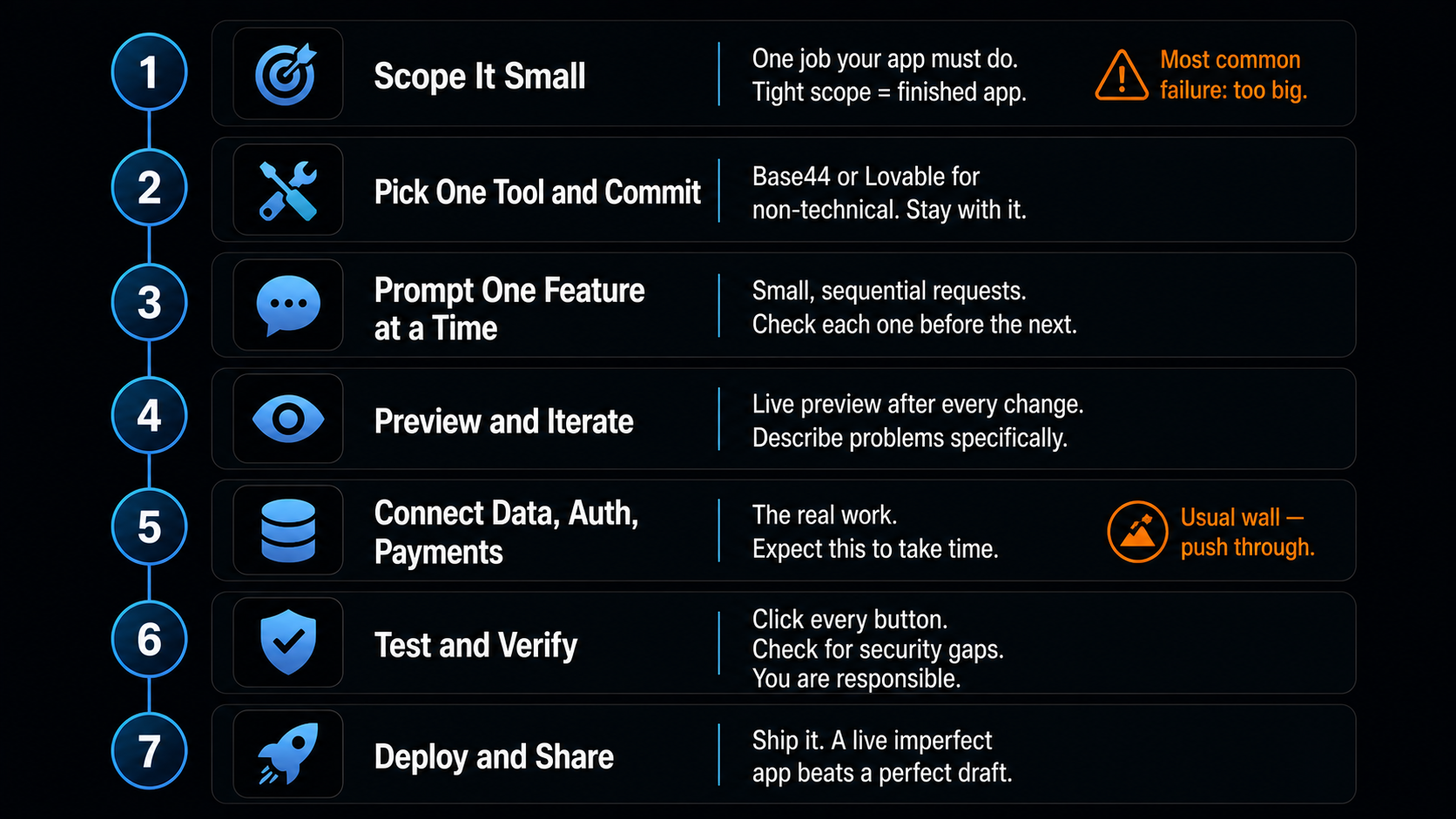
Your AI app builder is only half of it. The method is what gets you to a finished product instead of an abandoned demo.
1. Scope It Small DEFINE
Resist the urge to build the everything-app. Pick one job your app must do — track expenses, book appointments, collect leads. A tight scope is the single biggest predictor of finishing. You can always add later.
2. Pick One Tool and Commit CHOOSE
Choose one builder from the list that matches your comfort level and stay with it for this project. Tool-hopping mid-build wastes your reps. If you are non-technical, Base44 or Lovable are safe starts.
3. Prompt Clearly, One Feature at a Time BUILD
Describe your app plainly, then add features one at a time rather than in one giant prompt. “Add a login screen.” Check it. “Now add a dashboard that lists saved items.” Check it. Small, sequential requests give the AI its best chance of getting each one right.
4. Preview and Iterate REFINE
Use the live preview after every change. When something breaks, change one thing at a time and describe the problem specifically — “the save button does nothing when clicked” beats “it’s broken.” Precise feedback gets precise fixes.
5. Connect Data, Auth, and Payments WIRE UP
This is where real apps are made or abandoned. Connect your database, user login, and — if you are charging — payments. Some tools handle this automatically; others make you set up an external service. This step is the usual wall, so expect it and push through it.
6. Test and Verify CHECK
Click every button, try to break your own app, and check the AI has not left anything insecure. Good tools scan for exposed keys and weak authentication, but you are responsible for the final check. Never ship something you have not tested end to end.
7. Deploy and Share SHIP
Publish it, get the link in front of real users, and watch what they actually do. A shipped, imperfect app teaches you more in a day than another week of polishing in private ever will.
The Honest Truth About Vibe Coding
This is the section the tool websites skip, and it is the most important one. The question in 2026 is no longer “can AI build apps?” It clearly can. The real question is “can AI get an app all the way to production?” — and that is where the gap lives.
Most tools are brilliant at the wow moment: your description becomes a working interface in seconds. What they are quieter about is that a beautiful mockup is not a deployed product. Between the demo and the live app sits the unglamorous work — connecting a real database, setting up secure authentication, handling payments, and fixing the edge cases that break when a real person uses it in a way you did not expect. Several popular tools still hand this configuration to you, and it is exactly where non-technical builders get stuck.
Here is the reframe that actually helps: the tool matters less than your reps. Scoping, prompting, verifying, and debugging are the skills that get you to a shipped product, and they transfer across every tool. Hitting a wall is not the tool failing you — it is the precise moment your real ability starts to grow. Pick one builder, choose something small, and ship it. The reps you build stay with you long after you outgrow your first tool.
What This Costs in India
Most of these tools run on credit or subscription models, typically billed in dollars, which is worth planning for as an Indian user since it usually means a card that works internationally.
| Option | Approx price | Notes |
|---|---|---|
| Free tiers | ₹0 | Most builders offer one; enough to build and learn |
| Paid plans | ~₹1,700–2,600 / month | Usually $20–30, dollar billing, credit-based |
| Open-source (e.g. Dyad) | Free | Bring your own AI API key |
Start on a free AI app builder tier to learn the workflow before you pay for anything. Because credits get consumed by iteration, a tight scope also keeps your costs down — another reason to build small first.
A Realistic First Project
If you are staring at a blank screen, do not start with your big startup idea. Start with something small and genuinely useful that you can finish in a weekend. A simple internal tool for your own business — an inventory tracker, a booking form, a lead collector — is perfect, because you are the user and you know exactly what “done” looks like.
Other strong first projects include a landing page with a waitlist to test demand for an idea, a basic membership page for your audience, or a single-purpose calculator or quiz. The goal of your first build is not to change your life. It is to go all the way from idea to shipped, so you learn the full loop. Once you have done that once, the second app is dramatically easier.
What You Can and Cannot Build With an AI App Builder
Setting honest expectations saves a lot of frustration. An AI app builder is superb at a specific band of software and genuinely struggles beyond it, so aim your idea at the sweet spot.
What works well: internal tools and dashboards, SaaS MVPs, booking and scheduling apps, lead-capture and waitlist pages, simple marketplaces, membership sites, CRUD apps that store and display data, and content or portfolio sites. If your idea is one of these, an AI app builder will take you a long way, often to a launchable product.
Where it gets harder: apps with heavy real-time features, complex multi-user permissions, serious data-processing at scale, native mobile apps with deep device integration, or anything in a regulated space like healthcare or finance where compliance and security are non-negotiable. You can often still start with an AI app builder here, but you will hit the point where a developer needs to take over sooner. The skill is matching your ambition to what the tool does well, then expanding once you have proven the idea. A validated MVP built by an AI app builder is a far stronger position to hire from than a pitch deck alone.
Where AIClips Fits
Let us be honest about our lane. AIClips is not an app builder — it is a content platform, and we are not going to pretend otherwise. But the two fit together neatly. Once you have built your app with one of these tools, you have to market it, and that is where AIClips comes in: generate your launch video, demo clips, thumbnails, product shots, and social creatives across 461 models, in rupees, at ₹349/month. You build the product with a no-code AI app builder; you build the audience for it with AIClips. Different jobs, same solo founder, no big team required for either.
Frequently Asked Questions
Can I really build an app without knowing how to code?
Which is the best no-code AI app builder for beginners?
What is the difference between no-code and vibe coding?
Are AI-built apps good enough to launch?
How much does it cost to build an app with AI?
Will I still need a developer eventually?
Built Your App? Now Market It on AIClips
Launch videos, demo clips, thumbnails, and product shots across 461 models. INR pricing, UPI, from ₹349/month.
Start on AIClips →