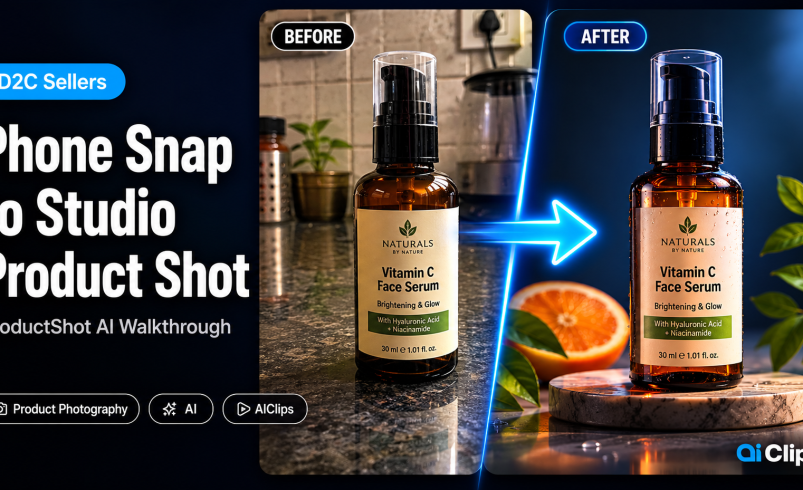

A typical product photoshoot in India costs between ₹15,000 and ₹50,000. You book the studio, hire the photographer, hire the model, wait three days for edited photos — and still might not get images that actually convert. AI product photography changes this entirely. This walkthrough shows you how to go from a phone snap to a commercial-grade product shot using AIClips ProductShot AI, in under a minute.
This guide is for D2C founders, small ecommerce sellers, and brand owners who are done spending a lakh per season on photography that could be replaced with product photo AI that costs ₹349/month.
| What it does | Transforms a plain phone photo of your product into a studio-quality shot with professional backgrounds, lighting, and shadows — no photographer needed. |
| Tool on AIClips | ProductShot AI app — unlimited on Agency plan (₹999/month). Also uses credits on Creator and Professional plans. |
| Presets available | Lifestyle, Studio, Hero, Minimal — each generates multiple variants per run. |
| Best for | Amazon/Flipkart listings, Shopify stores, Instagram product posts, D2C brand content. |
| Cost vs traditional shoot | Traditional: ₹15,000–50,000 per session. ProductShot AI: ₹999/month for unlimited runs. |
Why Indian D2C Brands Waste Lakhs on Product Photography
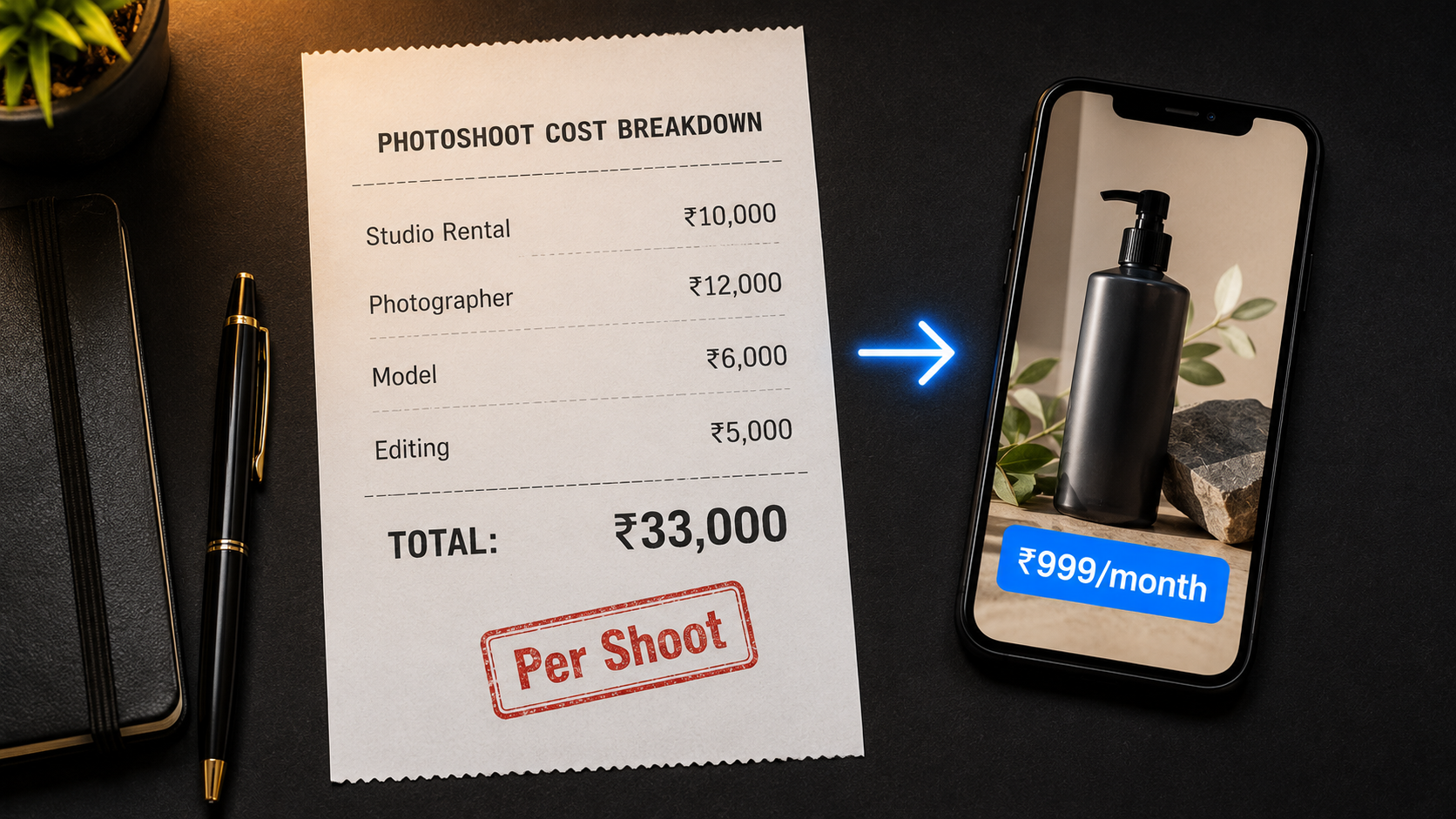
Here is what a single product photoshoot actually costs a small brand in India:
- Studio rental: ₹5,000–15,000 per day
- Photographer: ₹5,000–20,000
- Model (if needed): ₹3,000–10,000
- Editing and retouching: ₹2,000–8,000
- Total for 20–30 usable images: ₹15,000–50,000
For a brand managing 50 SKUs across three seasons, that adds up to over ₹2 lakh per year on photography alone. And when a product gets updated — new colour, new packaging, small design change — the entire shoot needs to happen again.
The deeper problem is not just cost. It is time. A traditional shoot takes days from booking to final delivery. If you are launching on a deadline or responding to a trend, you do not have days.
This is exactly the gap that ecommerce ai photography tools were built to fill. You take a clean phone photo of the product, upload it, and the AI generates studio-quality output in seconds. No studio, no photographer, no waiting.
What ProductShot AI Actually Does
ProductShot AI on AIClips is not a filter. It does not just clean up your background or adjust the brightness. It recreates the entire scene around your product.
You upload a phone photo of your product. The AI identifies the product, removes the existing background, reconstructs realistic lighting, adds natural shadows and reflections, and places the product inside a professionally composed scene — all automatically. The output looks like it came from a studio setup costing ₹20,000+.
The key difference between this and a simple background remover is the lighting. When you remove a background and paste a product onto a new one, the shadows and lighting do not match — the product looks cut-and-pasted. ProductShot AI regenerates the lighting to be consistent with the new scene, which is what makes the output look genuinely professional.
For food products, AIClips also has FoodGlow Studio — a dedicated tool optimised for the specific lighting and colour grading that makes food photography look appetising. And for fashion and apparel, FitSnap Virtual Try-On places your garments on AI models without needing a physical model shoot.
Take a Phone Photo That AI Product Photography Can Transform
The quality of your output depends heavily on the quality of your input. These are the exact conditions that produce the best results with ProductShot AI.
Lighting
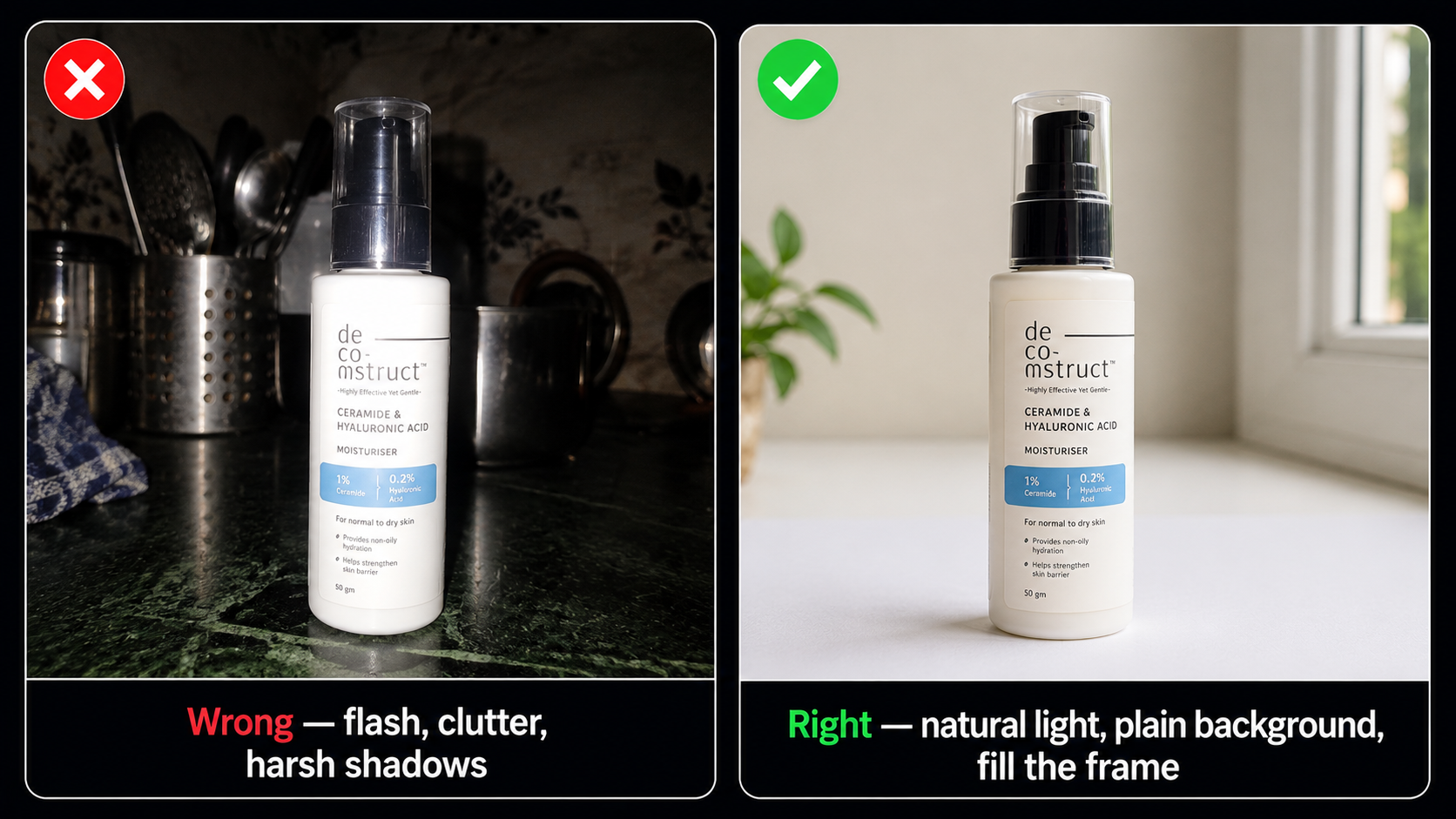
Natural window light is the best option. Place your product near a window with indirect sunlight — not direct sun which creates harsh shadows. The product should be evenly lit with no dark patches on the main face you want to show. Avoid using your phone flash, which creates a flat, washed-out look and kills texture detail.
Background
Use a plain white or light grey surface. A sheet of A3 white paper, a white wall, or a clean table surface all work. The AI removes this background entirely — but a cleaner input background means cleaner edge detection around the product, especially for irregular shapes like jewellery, plants, or textiles.
Camera Setup
- Shoot from the front or at a slight angle — the “hero shot” perspective that shows the product at its best
- Fill the frame — the product should take up 70–80% of the photo, not be a small object in the centre of a large empty background
- Keep the phone steady — blur reduces the AI’s ability to detect fine edges accurately
- Use the highest resolution your phone supports — more pixels means sharper output after AI processing
Choose the Right Preset for Your Platform
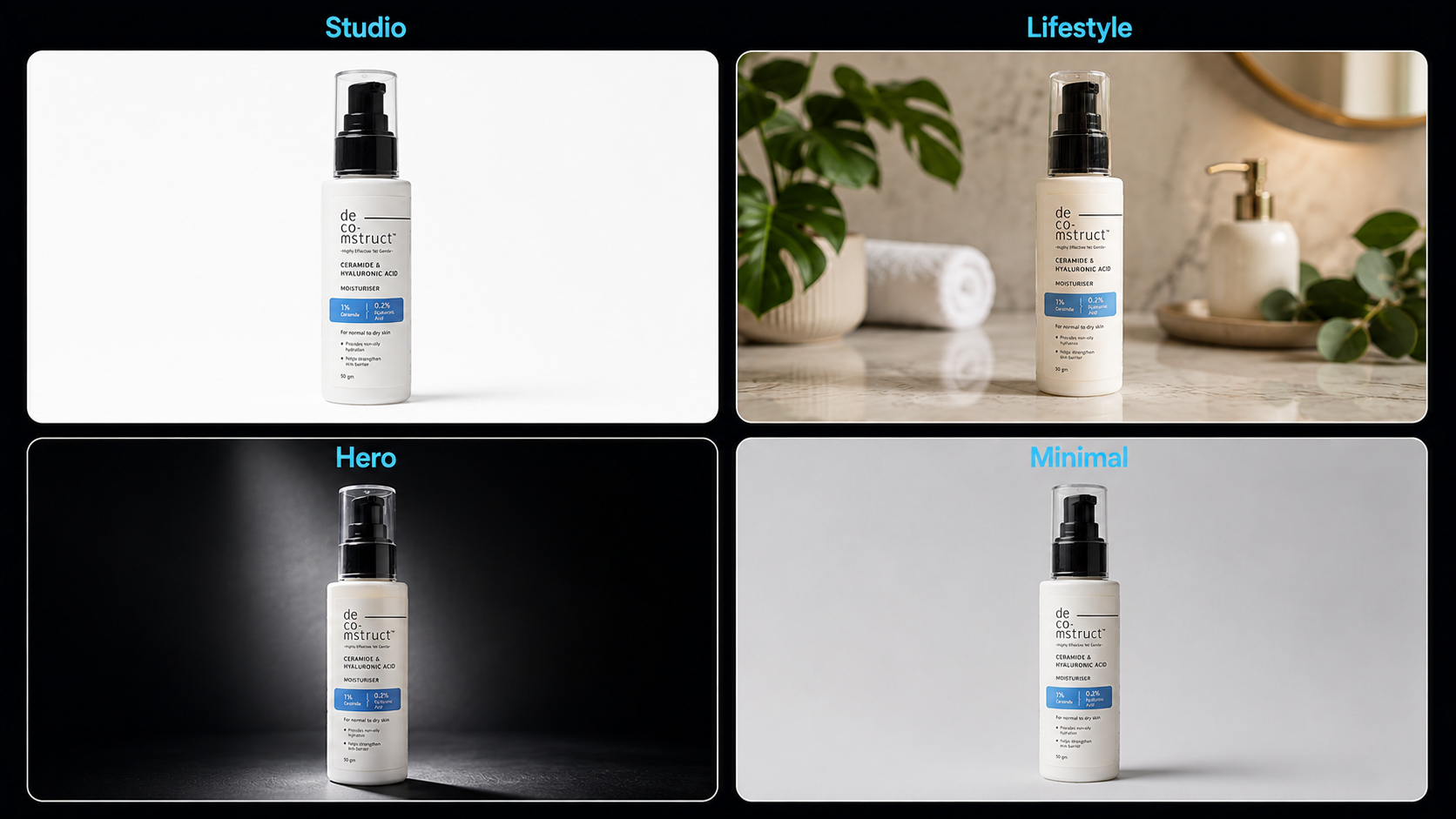
ProductShot AI on AIClips has four preset categories. Each one is designed for a different use case. Choosing the right preset matters because what works on Instagram does not always meet Amazon’s listing requirements, and vice versa.
Studio Preset
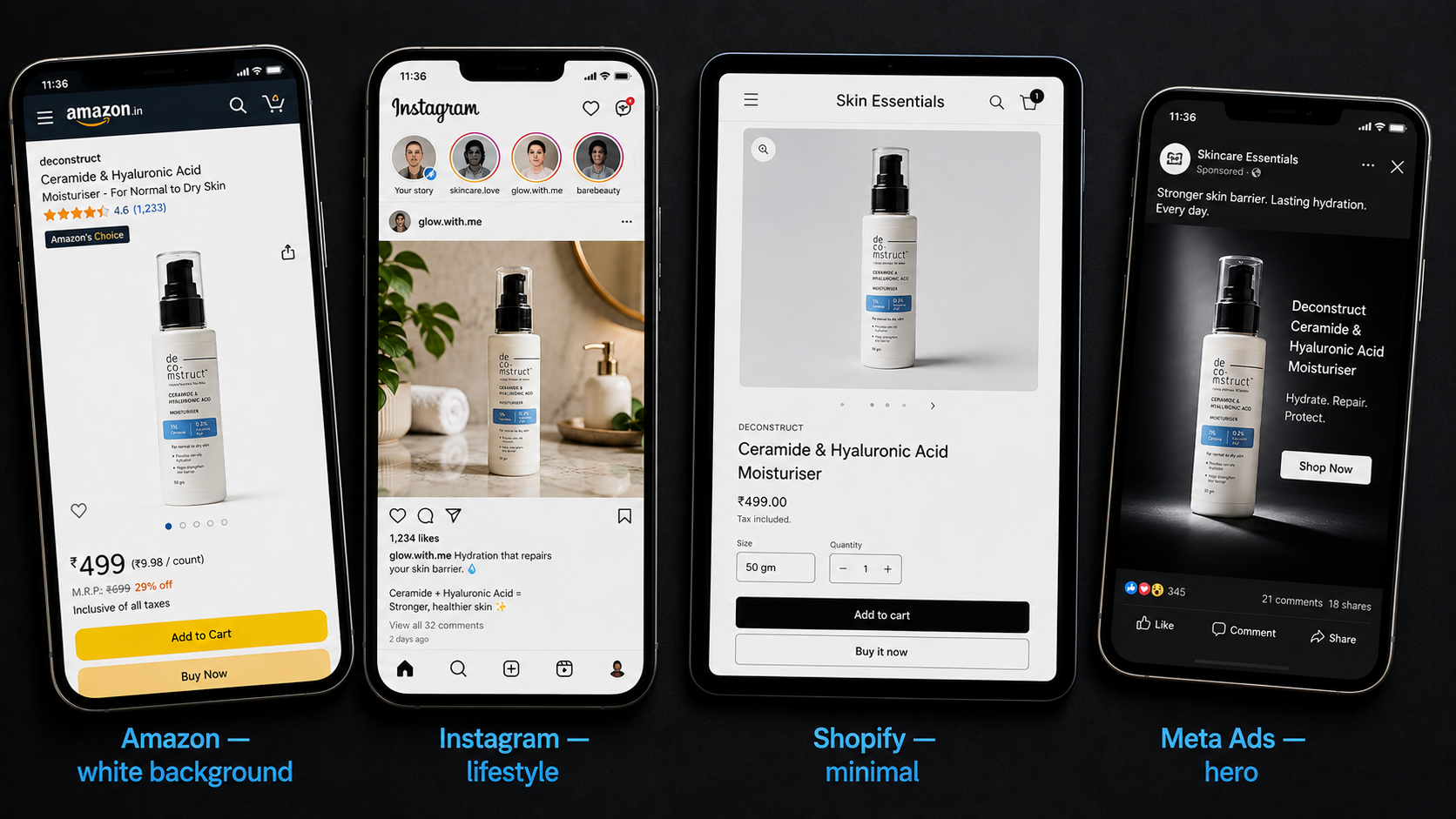
Best for Amazon · Flipkart · MeeshoClean white or neutral background, professional studio lighting, accurate shadow. This is the standard for marketplace listing images. Amazon requires the main product image to have a pure white background — the Studio preset produces this automatically.
Good for: Amazon main listing image, Flipkart catalogue, marketplace compliance shots.
Lifestyle Preset
Best for Instagram · Shopify · AdsPlaces your product inside a realistic scene — a kitchen counter, a marble surface, a wooden table with props. The AI generates a contextual environment that makes the product feel aspirational and in-use. This is what drives conversions on social media and brand websites.
Good for: Instagram posts, Shopify store hero images, Facebook and Instagram ads.
Hero Preset
Best for brand websites · campaignsDramatic lighting, dark or gradient backgrounds, cinematic product presentation. Used for launch campaigns, brand website headers, and high-impact ad creatives where you want the product to stand out as the main visual element.
Good for: Brand website, launch campaigns, premium product positioning.
Minimal Preset
Best for Shopify · brand consistencyClean, uncluttered background with subtle shadow. No distracting props or scenes. The focus stays entirely on the product. Ideal for brands that want a consistent, gallery-like look across their entire product catalogue.
Good for: Shopify product pages, consistent catalogue look, minimal brand aesthetic.
Generate Multiple Variants and Pick the Best
Each ProductShot AI generation produces several variants from the same input image and preset. Do not stop at the first result.
Look at each variant and evaluate:
- Is the product shape preserved accurately? No distortion on edges or corners?
- Does the lighting look natural — consistent direction, believable shadows?
- Is the background scene appropriate for the product category?
- Does the overall image look like something a professional photographer would produce?
If none of the variants pass these checks, try changing the input photo before regenerating. A better-lit input almost always produces a noticeably better output. The AI can only work with what it sees — garbage in, garbage out.
Export for Your Platform — Size and Format Requirements
Different platforms have different technical requirements for product images. Here is what you need to know before exporting.
| Platform | Minimum Size | Background | Format | Notes |
|---|---|---|---|---|
| Amazon India (main image) | 1000×1000px minimum | Pure white only | JPEG or PNG | Use Studio preset. No props, no text, no logos in the main image. |
| Flipkart | 500×500px minimum | White preferred | JPEG or PNG | White background for main image. Lifestyle shots allowed in additional images. |
| Shopify (product page) | 2048×2048px recommended | Any | JPEG or PNG | Square format recommended. Consistent look across all SKUs. |
| Instagram feed post | 1080×1080px | Any | JPEG | Use Lifestyle or Minimal preset for better engagement. |
| Instagram Stories / Reels | 1080×1920px | Any | JPEG or PNG | Hero preset works well here — full-bleed dramatic product shot. |
| Facebook / Meta Ads | 1200×628px (landscape) | Any | JPEG or PNG | Lifestyle preset performs best in feed ads. |
AIClips exports at high resolution by default. After downloading, use a free tool like Squoosh or TinyPNG to compress the file size before uploading to your store — this improves page load speed without visible quality loss.
Real Numbers — What ProductShot AI Saves a D2C Brand
Here is the math for a small D2C brand managing 30 SKUs that refreshes its catalogue twice a year.
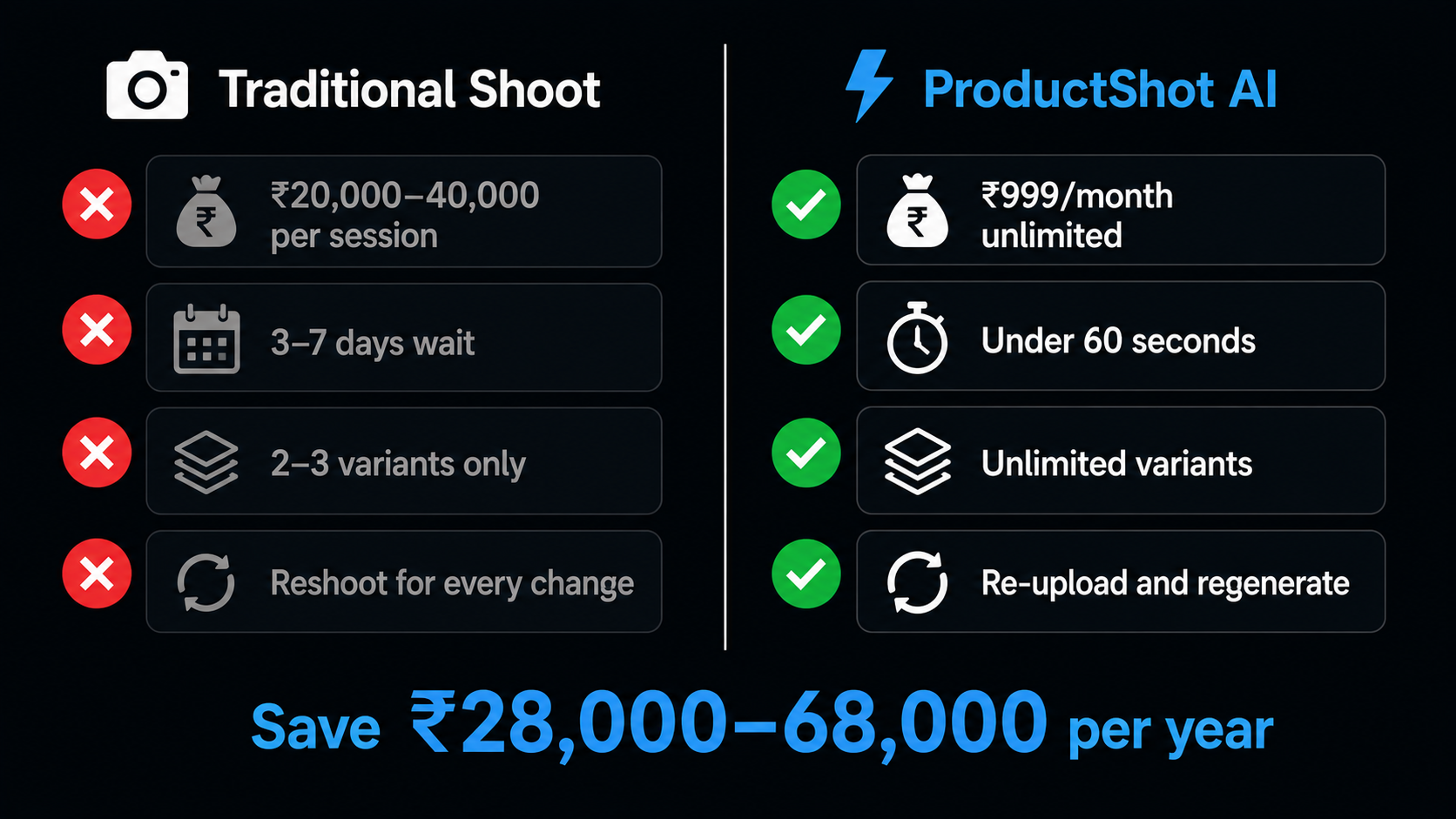
| Traditional Shoot | ProductShot AI on AIClips | |
|---|---|---|
| Cost per session | ₹20,000–40,000 | ₹999/month (unlimited) |
| Sessions per year | 2 (seasonal refreshes) | Unlimited, any time |
| Annual cost | ₹40,000–80,000 | ₹11,988/year |
| Time to first image | 3–7 days after shoot | Under 60 seconds |
| Variants per product | Usually 2–3 (cost limits) | Unlimited variants |
| Changes for new colour | Full reshoot needed | Re-upload, regenerate |
The saving on a 30-SKU catalogue is ₹28,000–68,000 per year. For a brand also doing seasonal campaigns, add another ₹20,000–30,000 in savings. The quality difference is not visible to the average customer — a well-generated AI product shot is indistinguishable from a studio shot in a social media feed or product listing.
When AI Product Photography Does Not Work Well
Honest answer — there are product types and scenarios where the output will not match a professional shoot.
| Product Type / Situation | Why It Is Difficult | Workaround |
|---|---|---|
| Transparent or glass products | The AI struggles to reconstruct realistic reflections and refraction in glass surfaces | Use a plain background and minimal preset — simpler scenes hide glass artefacts better |
| Jewellery with very fine detail | Fine chains, micro engravings, and gem facets require extremely high-resolution input to preserve accurately | Use macro mode on your phone camera. More detail in = more detail out. |
| Clothing or fabric without a model | Flat-lay fabric shots look flat in AI product scenes — the AI cannot simulate how it drapes on a body | Use FitSnap Virtual Try-On on AIClips instead — it places the garment on an AI model |
| Very large products (furniture, appliances) | Context scenes for large items require the AI to generate a full room, which can look unrealistic | Use the minimal or studio preset — a clean background looks professional for large items |
Other AI Product Photography Tools on AIClips
ProductShot AI is the flagship tool, but AIClips has several specialised options depending on your product category.
| Tool | Best For | Plan Availability |
|---|---|---|
| ProductShot AI | General ecommerce ai photography — all product categories | All plans (unlimited on Agency) |
| FoodGlow Studio | Food and beverage products — appetising colour grading and lighting | All plans (unlimited on Agency) |
| FitSnap Virtual Try-On | Fashion and apparel — garments on AI models without a real model | All plans (unlimited on Agency) |
| Angles | Multi-angle product shots from a single photo — 360-degree views | All plans (unlimited on Agency) |
| Bria RMBG 2.0 | Clean background removal only — when you want to composite manually | Image Apps — all plans |
For a full walkthrough of removing video backgrounds from product demos, read the video background removal guide. And for a complete end-to-end workflow from product photo to published Reel, the Script to Reel in 30 Minutes guide covers how all these tools connect.
Frequently Asked Questions
What is AI product photography and how does it work on AIClips?
Does AI product photography meet Amazon India’s image guidelines?
What kind of phone photo gives the best results?
Can I use the same product photo for Amazon, Instagram, and Shopify?
Is ProductShot AI free on AIClips?
What is the difference between ProductShot AI and FoodGlow Studio on AIClips?
Try ProductShot AI on AIClips
Studio-quality product photo AI for Indian sellers. ₹999/month for unlimited runs — less than the cost of one traditional photoshoot.
Open AIClips ProductShot AI →