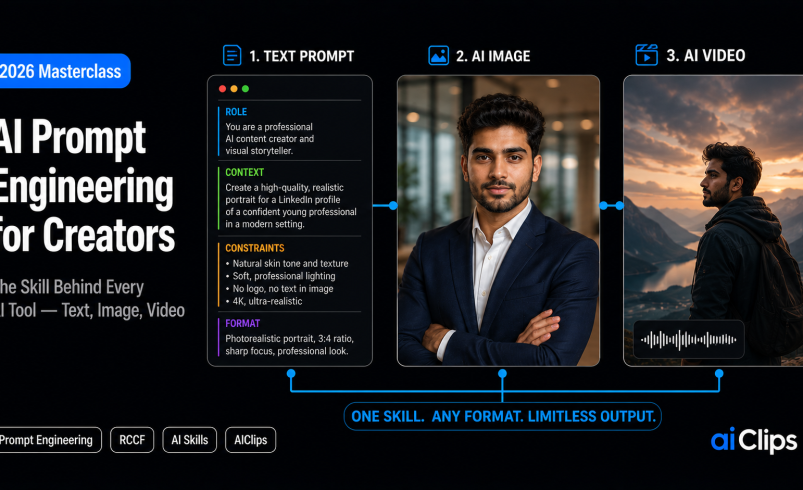

Give the same AI tool to two creators and you get two completely different results. One gets generic, forgettable output and quietly concludes “AI isn’t there yet.” The other gets work that looks professional. The tool was identical. The difference was the prompt. Prompt engineering is the quiet meta-skill that decides whether every other AI tool you use is worth the money, and in 2026 prompt engineering has become a real, learnable discipline rather than a lucky guess. This guide teaches the frameworks that actually work, for text, images, and video.
Here is the mindset shift to carry through the whole piece: the era of guessing what a model will produce is over. Good prompting is now precision, not poetry. Specificity beats cleverness every single time, and once you internalise that, your output changes overnight.
| What it is | The skill of structuring instructions so an AI reliably produces what you want, across text, image, and video tools. |
| The 2026 shift | Models already know how to reason. What they don’t know is your specific constraints. Specificity wins over clever tricks. |
| Text framework | RCCF — Role, Context, Constraints, Format. |
| Image framework | Subject, environment, composition, lighting, style, camera, quality, negatives. |
| Why it pays | Generic prompts waste credits and time. A good structure gets pro results on the first or second try. |
Why Prompt Engineering Is the Skill That Actually Matters
Every AI tool you will ever touch is a car, and prompt engineering is knowing how to drive. You can own the fastest model on the market and still crash it into a wall of generic output if you cannot give it clear direction. This is why prompt engineering matters more than tool choice: two people using the exact same image generator get results a world apart, and why the creators earning from AI are almost never the ones with secret access to better tools.
The money angle is real too. Generic prompts waste credits, because every vague attempt that comes back wrong is money spent for nothing. A creator who has learned to structure a prompt gets what they wanted on the first or second try, while the one guessing burns through ten generations to get there. Good prompt engineering is, quite literally, cheaper. Multiply that across a month of work and prompt engineering pays for itself many times over. It is also increasingly iterative — a large share of AI conversations in 2026 involve refining a prompt rather than accepting the first answer, which tells you that even experts treat it as a loop, not a one-shot.
The Big Shift in 2026: Specificity Over Cleverness
If you learned prompting in 2023, unlearn half of it. Back then, elaborate tricks and long “think step by step” incantations genuinely helped, because the models needed the scaffolding. They do not anymore. Modern models already know how to reason. What they still cannot guess is your specific situation — your audience, your constraints, your brand voice.
This flips the whole approach. A short, sharply constrained prompt now beats a rambling five-hundred-word one. You do not need to teach the model how to think. You need to tell it exactly what you want and, just as importantly, what you do not want. Every hour spent adding clever reasoning steps would be better spent adding one more concrete constraint. That single idea is the heart of modern prompt engineering practice, and it is why the frameworks below are all about structure rather than length.
Writing Text Prompts: The RCCF Framework
For anything written — scripts, captions, blogs, emails, marketing copy — the cleanest prompt engineering structure is RCCF. Four parts, in order, and each one closes a gap the model would otherwise fill with a guess.
| Part | What it does | Example |
|---|---|---|
| Role | Gives the AI a personality and perspective | “You are a copywriter who hates buzzwords.” |
| Context | Grounds it in your situation | “This is an Instagram caption for a D2C skincare brand in India.” |
| Constraints | Sets the guardrails | “Under 40 words. No hashtags. One clear call to action.” |
| Format | Defines the structure of the output | “Give me three options as a numbered list.” |
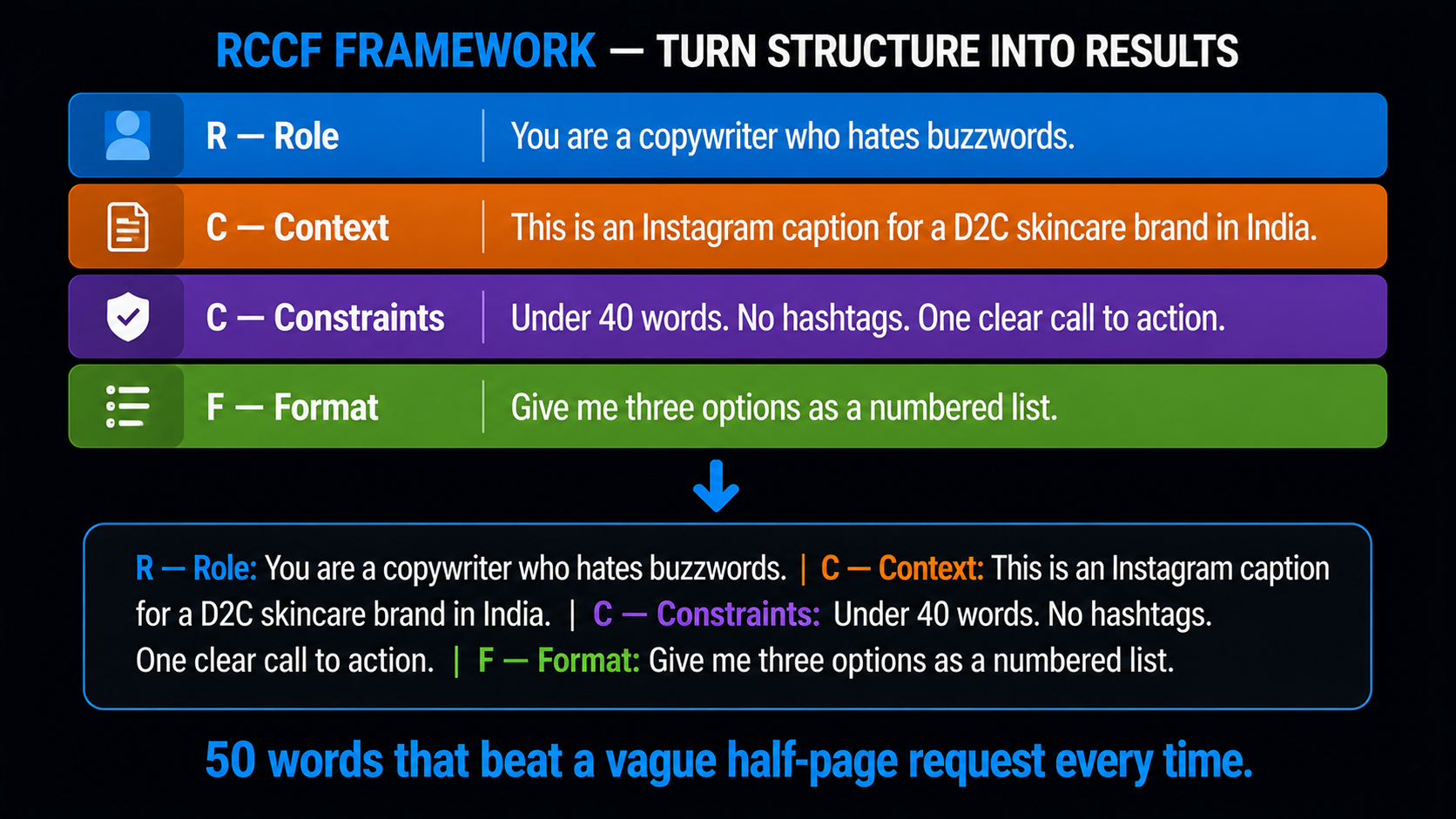
Put together, that is a prompt of maybe fifty words, and it will beat a vague half-page request every time. The reason is simple: you have removed every place where the AI had to guess. Role, context, constraints, and format are exactly the four things a model cannot infer about your specific job, so spelling them out is where the quality comes from. Skip any one of them and the model quietly fills the gap with an assumption, which is usually where a disappointing draft comes from.
Writing Image Prompts: Think Like a Director, Not an Illustrator
Image models work nothing like text models, and this is where a lot of prompt engineering advice goes wrong. A text model reasons through language. An image model is a visual rendering engine, so you get the best from it by talking to it like a film crew rather than an artist. You are the casting director, the cinematographer, and the lighting technician all at once, and each of those roles needs an instruction.
The reliable structure stacks specific blocks: subject, environment, composition, lighting, style, camera, quality, and negatives. The first few blocks decide what appears; the later ones decide whether it looks amateur or professional. Be relentlessly specific about the subject in particular, because vagueness there is what produces those generic, plastic faces. Do not write “a woman.” Write her age, her exact clothing, her expression, and her pose.
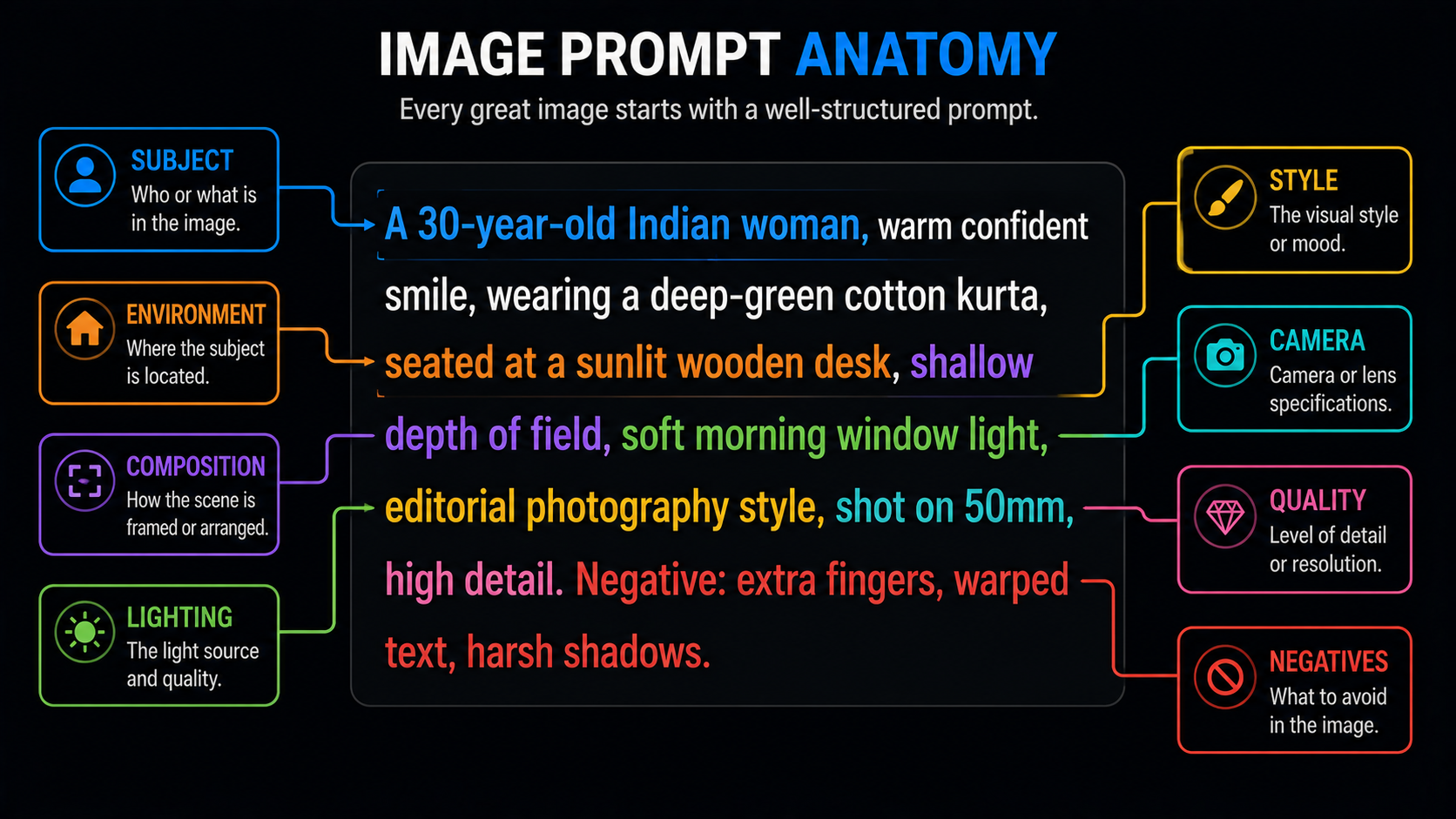
That prompt leaves the model very little to guess. Compare it to “a woman working,” which leaves it everything. This is the entire craft of prompt engineering for images: replace every vague word with a specific one, and add a negatives line to rule out the usual glitches.
Writing Video Prompts, and Why Each Model Is Different
Video is where prompt engineering gets genuinely technical, and where a lesson most people learn the hard way lives: a prompt tuned for one model often falls flat on another. The big video models each interpret the same words differently, so you cannot copy a Sora prompt straight into Kling or Veo and expect the same result. Build for the model you are actually using.
A solid base structure is subject, action, scene, style, camera move, and audio. Keep the action to a single beat and the camera to a single move, because stacking either makes the output unstable. The newer dimension is sound: models like Sora and Veo now generate synchronised audio, which means your prompt should describe the sound design too, not just the picture. If you leave audio out, you get a generic mix or silence.
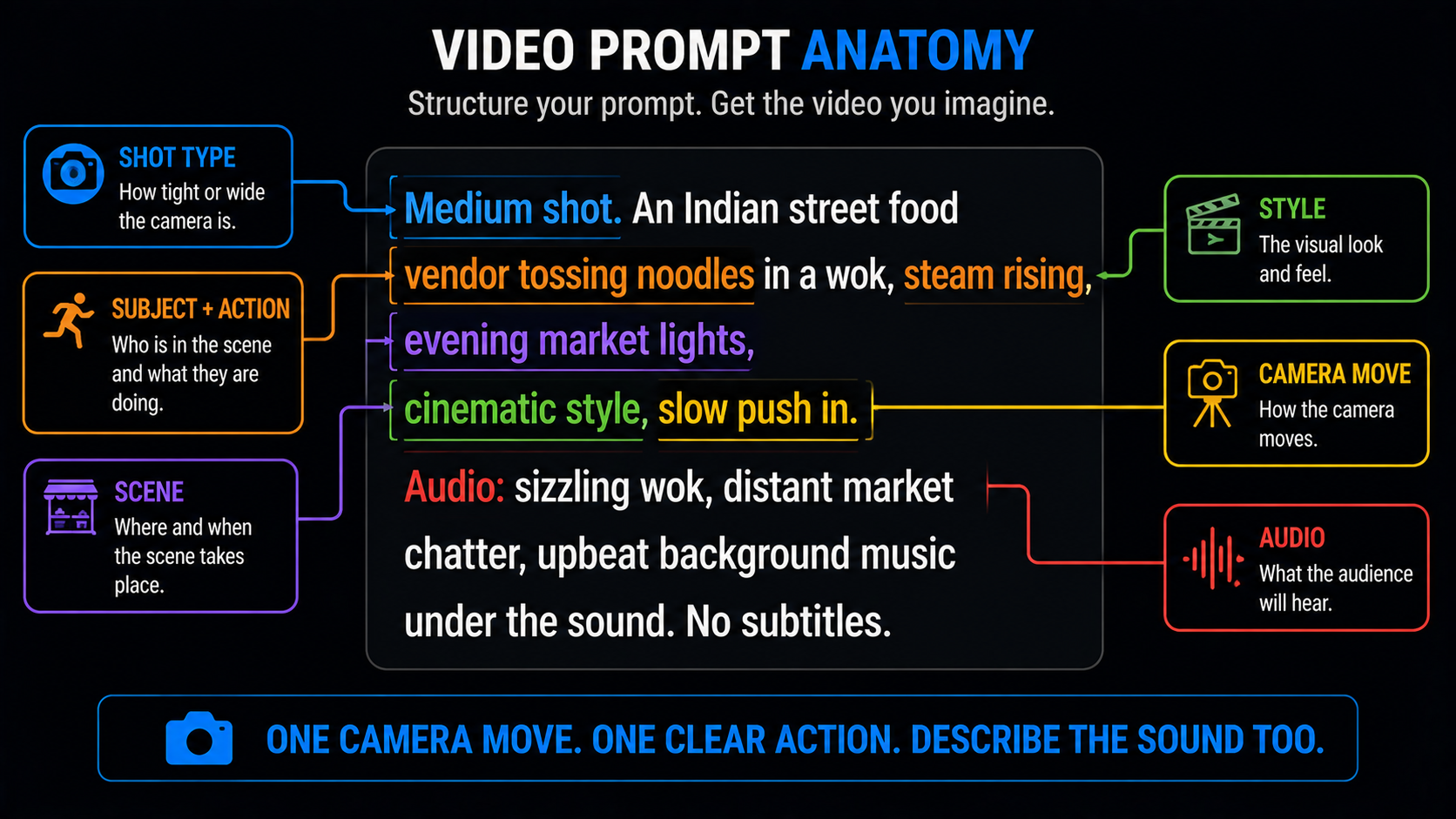
A money-saving habit for video specifically: test your idea at a short, low-quality setting before you render the final version. Video generations cost far more than images, so proving the motion and framing work on a cheap five-second draft, then re-rendering at full quality once the prompt is right, is how you avoid burning credits on a flawed shot. Also set your aspect ratio deliberately — nine by sixteen for Reels and Shorts, sixteen by nine for YouTube — because reframing after the fact rarely looks clean.
The Techniques That Level You Up
Once the basic structures are second nature, these five prompt engineering habits are what separate a capable prompter from a genuinely good one.
1. Change One Thing at a Time ITERATE
When a result is close but not right, adjust a single element and regenerate. Change five things at once and you will never know which one fixed or broke it. Prompt engineering is a controlled experiment, not a lottery.
2. Always Use Negatives EXCLUDE
Telling the model what to avoid is as powerful as telling it what to include. A short negative list — warped hands, extra fingers, harsh light, mirrored text — heads off the most common failures before they happen.
3. Lock Your Consistency CONTROL
To keep a character or product identical across images, reuse the same seed and describe the subject with the exact same keywords every time — “blue linen shirt, silver watch.” Identical words plus a locked seed is how you stop the face drifting between shots.
4. Chain Your Prompts SEQUENCE
For a multi-shot sequence, carry key descriptive tokens from one prompt into the next so the look stays cohesive. This prompt-chaining approach is how creators build longer, consistent pieces instead of a set of clips that clearly do not belong together.
5. Build a Prompt Library REUSE
When a prompt works beautifully, save it. Keep a document of your best structures for thumbnails, product shots, scripts, and clips. Your library becomes your real advantage, because you stop starting from scratch and start from what already worked.
Common Prompt Mistakes to Avoid
Most weak output traces back to the same few prompt engineering errors. If your results disappoint, check yourself against this list first.
- Vague subjects. “A man in an office” gives the model total freedom to be generic. Specify everything that matters.
- The kitchen-sink prompt. Cramming twelve ideas into one prompt confuses the model. One clear intention beats five competing ones.
- Skipping negatives. No negative list means you accept every default glitch the model tends to produce.
- Not iterating. Abandoning a tool after one bad result is quitting at the exact moment prompt engineering starts to pay off.
- Copying prompts across models. A structure built for one model can fall flat on another. Adapt it to the tool you are using.
Your Prompt Engineering Practice Routine
Nobody gets good at prompt engineering by reading about it. It is like cooking — you can memorise every recipe and still burn dinner until you have actually stood at the stove a few times. You get good by doing it deliberately for a couple of weeks. Here is a simple routine that builds the skill fast without feeling like homework.
Start by picking one tool and one goal, say thumbnails or captions, and write ten prompts for it in a row, each one a little more specific than the last. Watch what changes as you tighten the wording. That single exercise teaches you more about prompt engineering than any list of tips, because you see cause and effect with your own eyes. Then take a prompt that worked and deliberately break it — remove the lighting, drop the negatives, make the subject vague — so you learn which parts were carrying the weight.
Once you have a feel for one tool, repeat the exercise on a different type, moving from text to image or image to video. You will quickly notice that the mindset transfers even when the exact wording does not, and that is the real prize. Good prompt engineering is not a hundred memorised prompts; it is a way of thinking about instruction that works on any model you meet. Keep every prompt that lands in a running document, and within a fortnight you will have both a personal playbook and an instinct for what a model needs.
Where AIClips Fits
Here is the honest, practical reason this skill and AIClips go together. The prompt engineering frameworks in this guide are portable, but the annoying part is usually access — a different subscription for every model, each with its own quirks. On AIClips you learn the structures once and apply them across 461 models in one dashboard, which is exactly where prompt engineering pays off, because you can test the same idea across image and video models and keep what works.
It is billed in rupees at ₹349/month with UPI, so experimenting does not mean juggling dollar subscriptions. For the image side, our AI image generator guide pairs well with this, and for video, the best AI video generators guide covers which model to prompt for which job.
Frequently Asked Questions
Is prompt engineering still relevant in 2026?
What is the RCCF framework?
How do image prompts differ from text prompts?
Why does my prompt work on one tool but not another?
How do I keep a character consistent across images?
Do I need to be technical to learn prompt engineering?
Practise Your Prompts on AIClips
Apply these frameworks across 461 image, video, and voice models in one dashboard. INR pricing, UPI, from ₹349/month.
Start on AIClips →