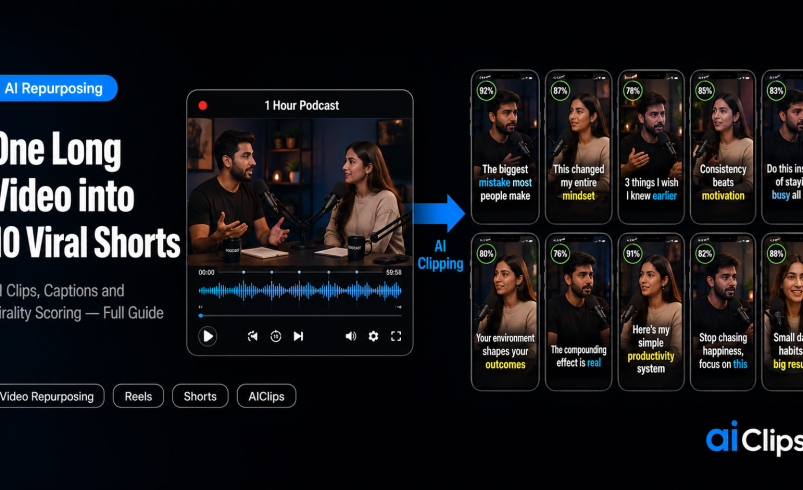

You already made the hard thing — a full podcast episode, a webinar, a long tutorial. Inside it are a dozen moments that would each stop the scroll as a Reel. Going from long video to shorts by hand means hours in an editor per clip. AI does it in minutes: it watches the whole video, finds the best moments, reframes them to vertical, captions them, and even scores which are most likely to go viral. This is how to turn one upload into a week of content.
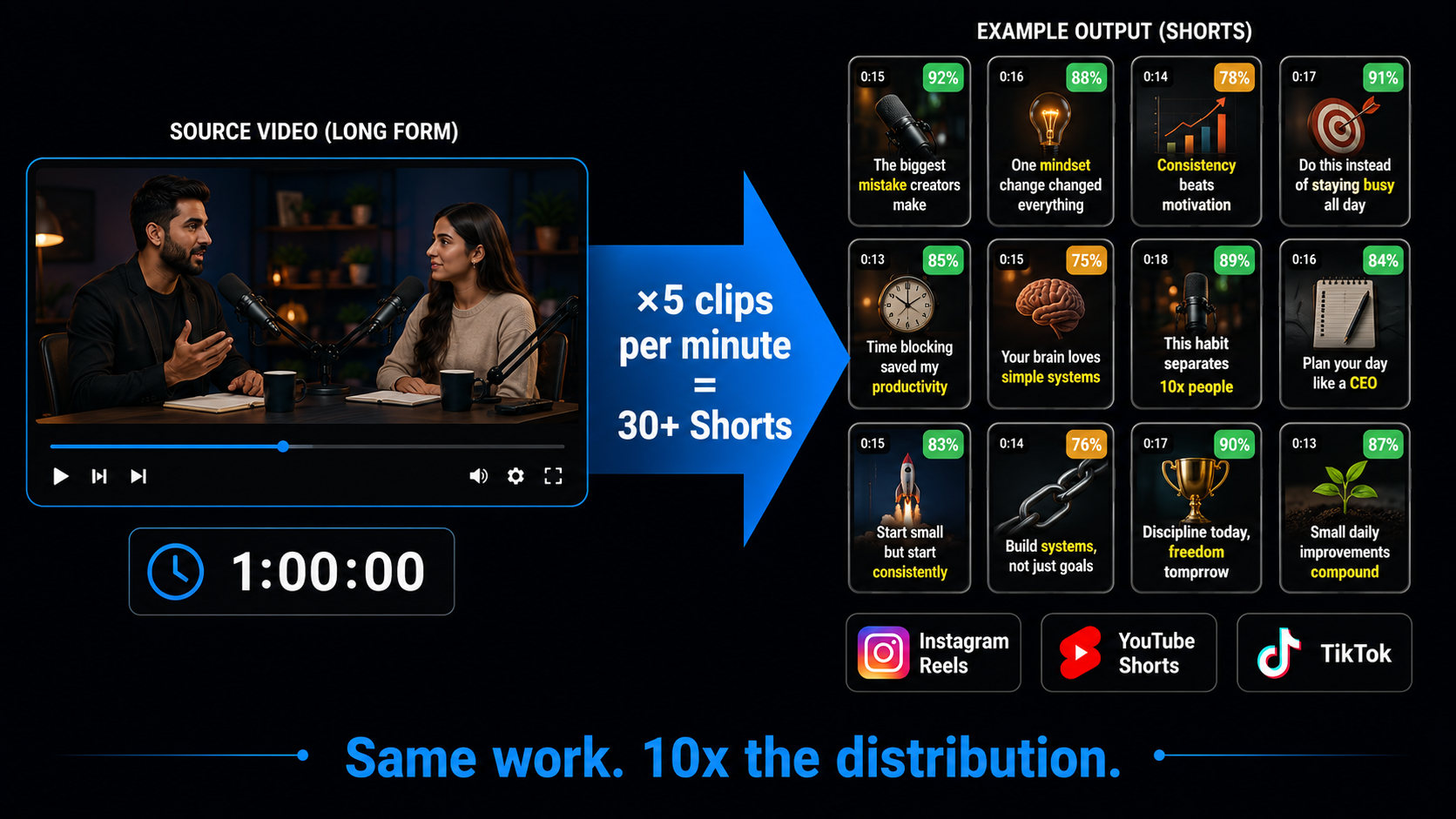
The maths is hard to argue with. A one-hour video can yield 30 or more clips. That is not more work. It is the same work, finally paying off across every platform you post on.
| What it does | AI analyses a long video, finds the strongest moments, reframes them to 9:16, adds captions, and scores each for viral potential. |
| The yield | Rule of thumb: roughly five clips per minute of source. An hour-long video can produce 30-plus shorts. |
| Works best for | Speech-heavy content — podcasts, interviews, tutorials, webinars, and vlogs. |
| Output | Vertical clips with captions, ready for Reels, Shorts, and TikTok, in one session. |
| On AIClips | Clipping, captions, and video tools in one place, ₹349/month with UPI. |
What AI Video Repurposing Actually Does
When you feed a long video to shorts through an AI clipping tool, it does far more than chop it into equal pieces. It transcribes the whole thing, reads the visual, audio, and sentiment cues, and works out where the genuinely engaging moments are — the strong hooks, the punchlines, the quotable lines. Then it turns each of those into a self-contained short.
The finishing is where the hours used to go when converting a long video to shorts by hand. The tool reframes the clip to a vertical 9:16, using speaker tracking so the person talking stays centred instead of drifting out of frame. It adds animated, word-by-word captions, since most social video is watched on mute. It trims filler words and dead air. And it gives each clip a virality score based on hook strength, pacing, and platform fit, so you know which to publish first.
Why One Long Video Is a Goldmine
Most creators sit on a back catalogue of long videos that each got one life and then went quiet. Repurposing changes that. The common rule of thumb is around five clips for every minute of source video, which means a single hour-long podcast can become 30 or more shorts. Each one is a fresh chance to reach someone who would never have watched the full episode.
This is the shift worth internalising: your bottleneck was never ideas, it was distribution. You already created the content. Turning one long video to shorts simply lets that work reach the short-form audiences on Reels, Shorts, and TikTok where most discovery now happens, without you filming anything new.
How to Turn a Long Video into Shorts, Step by Step
1. Upload or Paste a Link START
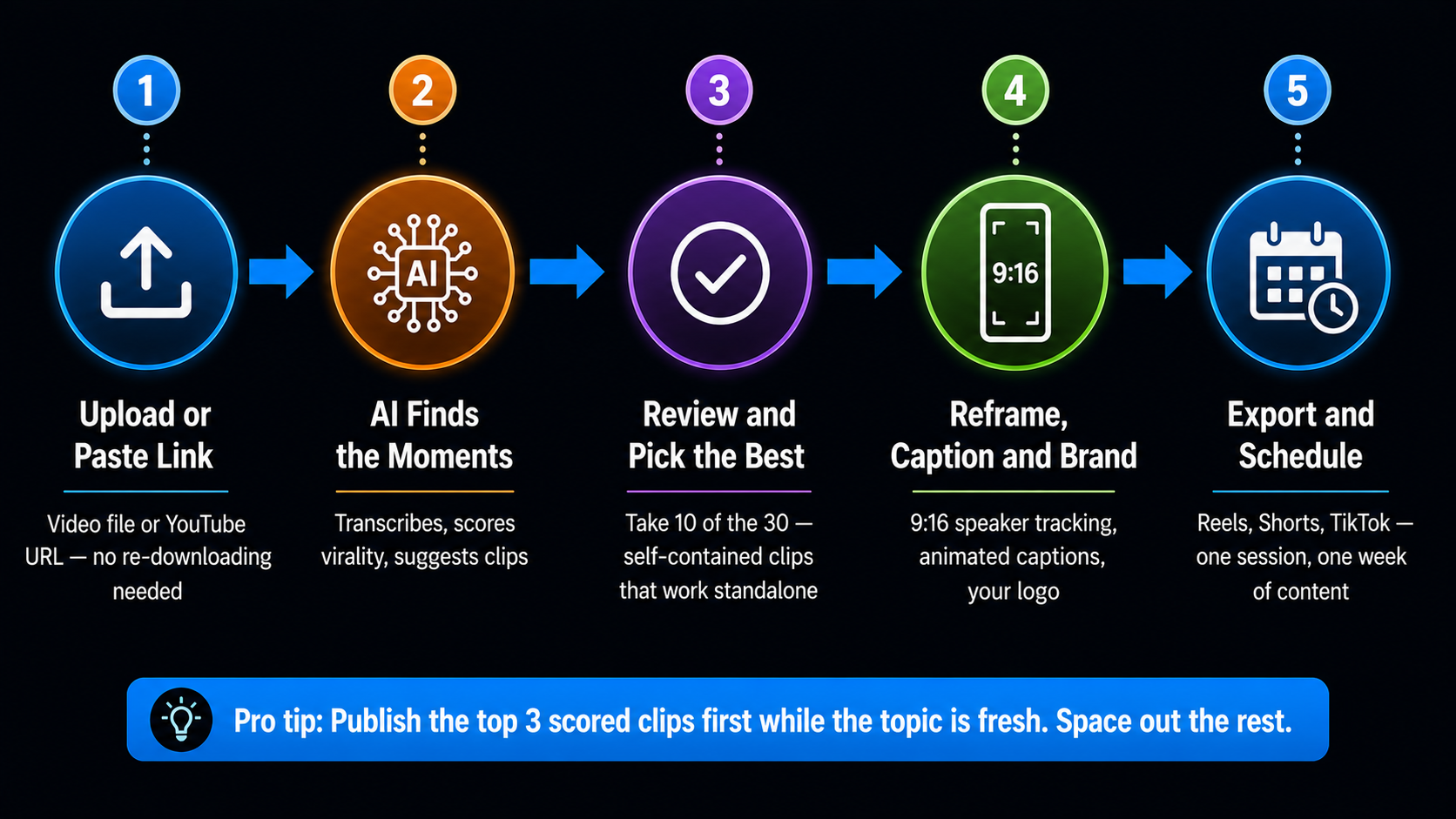
Drop in your video file or paste a YouTube link. Most tools handle videos up to a couple of hours and pull the source automatically, so there is no downloading and re-uploading. Speech-heavy content works best, because the AI leans on what is being said to find the good moments.
2. Let the AI Find the Moments ANALYSE
The AI transcribes and analyses the whole video, then returns a set of suggested clips, each with a virality score. This is the step that used to take an editor hours of scrubbing through footage looking for the parts worth cutting. Now it is a couple of minutes.
3. Review and Pick the Best CURATE
Do not publish all 30. The virality score tells you where to start, but your judgement of what fits your audience matters more than any algorithm. Pick the ten strongest, self-contained clips — the ones that make sense to someone who never saw the original.
4. Reframe, Caption, and Brand POLISH
Confirm the vertical framing keeps the speaker centred, choose a clean caption style, and apply your brand kit — your fonts, colours, and logo — so every clip is unmistakably yours. Keep captions in the safe zone so platform buttons do not cover them.
5. Export and Schedule Everywhere DISTRIBUTE
Export at full resolution and post to Reels, Shorts, and TikTok. Many tools let you schedule straight from the same place. One long video, a week of scheduled content, done in a single sitting.
What Makes a Clip Actually Go Viral
Going from long video to shorts is only half the job — the tool does the cutting, but these habits decide whether the clip performs.
- The hook is the first three seconds. Start on the most gripping line, not a slow build-up. If the clip does not start strong, trim the front.
- One idea per clip. A short that tries to make three points makes none. Self-contained beats comprehensive.
- Captions always on. Most viewers watch on mute, so on-screen text is not optional.
- End with a reason to act. A question, a takeaway, or a nudge to follow keeps the moment from just ending.
- Match the platform. The same clip can be tuned slightly for the pacing each platform rewards.
The Honest Part
What This Costs in India
| Option | Price | Notes |
|---|---|---|
| Free clip tools | ₹0 | Limited clips or watermarks, good for testing |
| AIClips Creator | ₹349 / month | Clipping, captions, and video tools plus 460 others, UPI |
| Dedicated clipping apps | $15–40 / month each | Per-tool, dollar billing, foreign card |
Running your long video to shorts clipping alongside your video generation, voiceovers, and thumbnails on one rupee bill keeps the whole content pipeline in one place. For the models behind your original videos, see our best AI video generators guide.
Frequently Asked Questions
How many shorts can I get from one long video?
What type of video works best for AI clipping?
Do I need editing skills to turn a long video into shorts?
Are AI virality scores accurate?
Can I make Shorts in regional languages?
Turn Your Videos into Shorts on AIClips
Clip, caption, and repurpose your long videos, plus 460 other AI models. INR pricing, UPI, from ₹349/month.
Start on AIClips →